- What Is a Speech Recognition System?
- Types of Speech Recognition Solutions
- How Does Speech Recognition Work? The Four-Step Process
- Core Components of a Speech Recognition System
- Benefits of Speech Recognition Systems
- Real-World Applications of Speech Recognition Systems Across Industries
- Limitations of Speech Recognition Tools and How to Overcome Them
- Build vs. Buy: Making the Right Decision for Your Business
- Step-by-Step Implementation Roadmap for Speech Recognition Systems
- Phase 1: Strategic assessment and readiness (Weeks 1–4)
- Phase 2: Proof of concept development (Weeks 5–12)
- Phase 3: Production model development (Weeks 13–24)
- Phase 4: Pre-production testing and validation (Weeks 25-32)
- Phase 5: Phased production rollout (Weeks 33–40)
- Phase 6: Full production and continuous optimization (Weeks 41+)
- Build an Enterprise-Grade Speech Recognition Solution with Space-O AI
- Frequently Asked Questions on Speech Recognition Software
- 1. How much does it cost to build a custom speech recognition system?
- 2. How long does it take to build a custom speech recognition system?
- 3. Can I start with a pre-built platform and migrate to a custom system later?
- 4. How do I measure the success of a speech recognition implementation?
- 5. What are the privacy and security considerations for speech recognition systems?
- 6. What training data do I need for a custom speech recognition system?
- How often should I retrain or update my speech recognition models?
Speech Recognition System: Definition, How It Works, Types, Use Cases, and Benefits

 Last Updated: December, 26 2025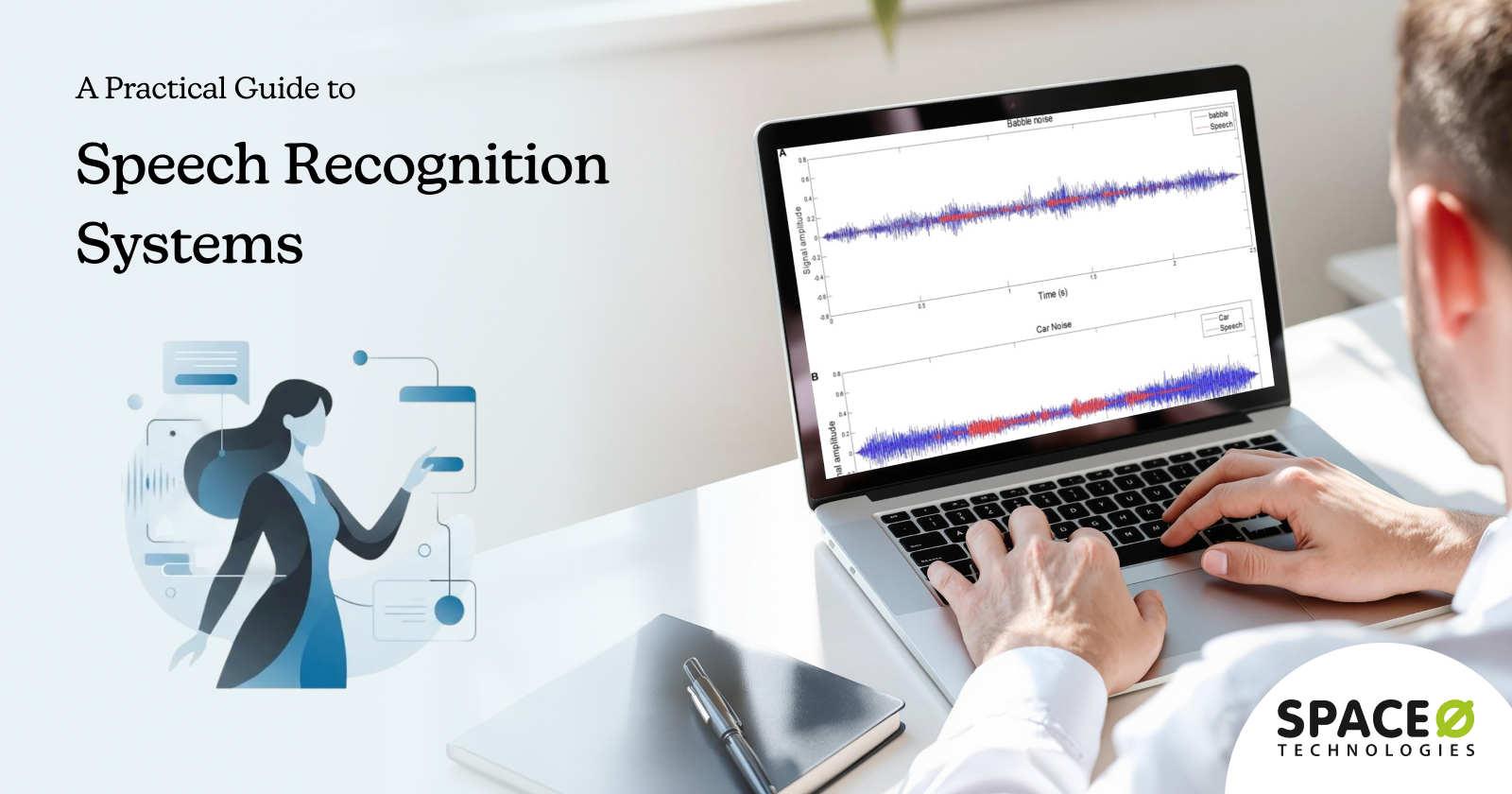
Speech recognition systems have become a core part of how people interact with technology, from voice assistants and customer support bots to real-time transcription and voice-enabled applications. As businesses and users increasingly expect faster, more natural interactions, the ability to convert spoken language into accurate text is no longer a nice-to-have capability. It is a foundational technology powering modern digital experiences.
This growing reliance on voice-based interfaces is reflected in market growth. According to MarketsandMarkets, the global speech and voice recognition market is projected to grow from USD 9.66 billion in 2025 to USD 23.11 billion by 2030, highlighting how rapidly organizations are investing in speech-driven solutions across industries.
At its core, a speech recognition system listens to human speech, processes audio signals, and translates them into written text that machines can understand and act on. Behind this seemingly simple interaction lies a complex combination of acoustic modeling, language processing, and machine learning techniques designed to handle different accents, languages, and real-world environments.
In this guide, we will break down what a speech recognition system is, how it works, and the technologies that make it possible. Get insights from our experience as a leading AI software development partner to understand the different types of speech recognition systems, common use cases across industries, key benefits, and challenges to consider before implementation.
What Is a Speech Recognition System?
A speech recognition system is a technology that enables computers and applications to listen to human speech and convert it into written text that machines can process, analyze, or act on. It allows users to interact with digital systems using spoken language instead of typing or manual input. This forms a critical component when you build conversational AI solutions.
At a basic level, a speech recognition system captures audio input through a microphone, processes the sound waves, and translates them into text using trained algorithms. This text can then be stored, searched, analyzed, or used to trigger actions within an application. The system focuses on understanding what is being said, not who is speaking, which distinguishes it from voice recognition systems that are designed to identify individuals.
Modern speech recognition systems rely heavily on machine learning and deep learning models trained on large volumes of speech data. These models help the system recognize different accents, pronunciations, speaking speeds, and languages, making speech recognition more accurate and practical for real-world use.
Speech recognition vs voice recognition: Key differences
Although the terms are often used interchangeably, speech recognition and voice recognition serve different purposes, with one focused on understanding spoken words and the other on identifying who is speaking. Here’s how these two technologies are different:
| Aspect | Speech Recognition | Voice Recognition |
| What It Does | Converts spoken words to text | Identifies who is speaking |
| Focus | What is being said | Who is saying it |
| Technology | Speech-to-text (STT), Automatic Speech Recognition (ASR) | Speaker identification, voice biometrics |
| Use Cases | Transcription, voice commands, dictation | Security authentication, fraud prevention |
| Key Question | “What did the person say?” | “Who is this person?” |
| Independence | Works regardless of speaker identity | Requires an individual voice profile |
| Primary Application | Business efficiency, accessibility | Security and compliance |
Speech recognition focuses on what is being said. A speech recognition system transcribes “Call my mother” accurately regardless of whether Sarah, John, or anyone else speaks the command. The identity of the speaker is irrelevant. The system only cares about the words.
Voice recognition, on the other hand, focuses on who is speaking. It’s a biometric technology that identifies or verifies individuals based on unique vocal characteristics like pitch, tone, and accent patterns. Voice recognition systems confirm “this is definitely Sarah speaking” or deny access if the voice doesn’t match an enrolled profile. This technology powers secure banking authentication and high-security applications.
Types of Speech Recognition Solutions
Speech recognition systems can be categorized based on how they handle speakers and how speech input is processed. Understanding these types helps in selecting the right system based on accuracy requirements, usage environment, and scale.
1. Speaker-dependent speech recognition
Speaker-dependent speech recognition systems are trained to recognize the speech patterns of a specific user or a limited group of users. During setup, the system learns the speaker’s voice characteristics, pronunciation, and speaking style to improve recognition accuracy.
Because the system is optimized for known speakers, it typically delivers higher accuracy compared to generalized models. This makes it suitable for personal devices, dictation tools, and environments where the same users interact with the system regularly. However, the main limitation is scalability. These systems perform poorly when used by untrained speakers and require additional training if new users need access.
2. Speaker-independent speech recognition
Speaker-independent speech recognition systems are designed to work across a wide range of users without prior voice training. They rely on large and diverse datasets to recognize speech from different accents, languages, and speaking styles.
This type of system is widely used in enterprise and consumer applications where multiple users interact with the same system. Common use cases include customer support automation, voice assistants, voice search, and call center transcription. While speaker-independent systems offer greater flexibility and scalability, their accuracy can be slightly lower in noisy environments or when handling uncommon accents without domain adaptation.
3. Continuous speech recognition
Continuous speech recognition systems are built to recognize natural, flowing speech without requiring pauses between words or phrases. Users can speak normally, and the system processes the audio in real time to generate text output.
These systems are commonly used in live transcription, meeting notes, customer support call analysis, and voice-enabled applications where uninterrupted speech is essential. Continuous recognition provides a more natural user experience but requires more advanced models to manage context, sentence structure, and variations in speech patterns.
4. Discrete speech recognition
Discrete speech recognition systems require users to speak in a controlled manner, often with brief pauses between words or commands. Each spoken input is treated as a separate unit, making recognition simpler and more predictable.
This approach is typically used in command-based systems and controlled environments, such as voice-controlled machinery, basic IVR systems, or industrial applications. While discrete speech recognition offers higher reliability in specific scenarios, it feels less natural and is not suitable for conversational or real-time transcription use cases.
These are the different types of speech recognition systems. Next, let’s understand how the speech recognition technology works.
Not Sure Which Speech Recognition System Fits Your Use Case?
Space-O AI helps you evaluate requirements and design speech recognition solutions that align with your business goals.
How Does Speech Recognition Work? The Four-Step Process
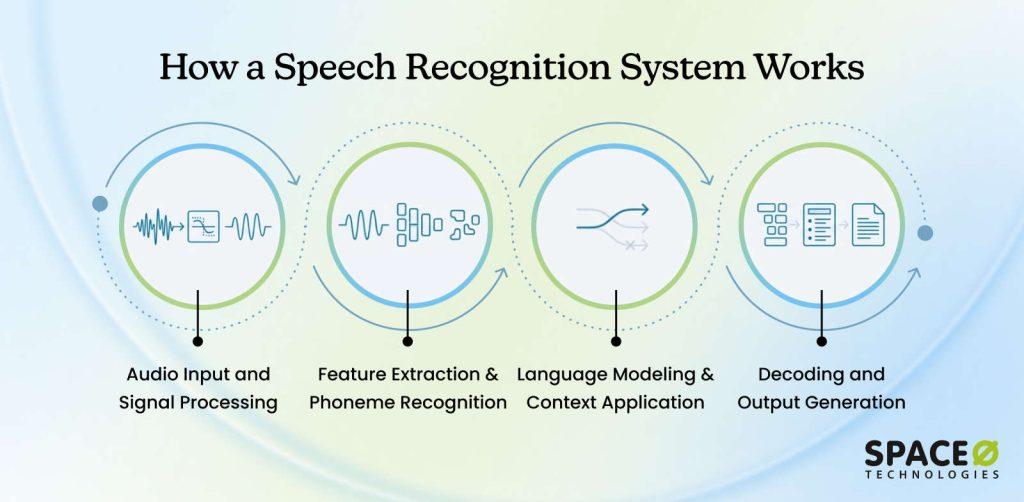
To understand how speech recognition works, let’s walk through what happens when you speak into a device and text appears. The process involves four distinct stages working together.
Step 1: Audio input and signal processing
When you speak, a microphone captures your voice as sound waves. But raw audio is messy with background noise, echo, and varying volume levels. Audio preprocessing algorithms clean the signal by reducing noise, normalizing volume, and removing artifacts.
Preprocessing that removes noise substantially improves recognition accuracy compared to unprocessed audio. After preprocessing, the audio gets digitized into discrete digital samples that computers can process. These samples represent the acoustic properties of your speech.
Step 2: Feature extraction and Phoneme recognition
Raw digital audio is too complex for efficient processing. Feature extraction converts it into a compact representation emphasizing what matters for speech recognition. MFCCs (Mel-Frequency Cepstral Coefficients) simulate how human ears perceive sound.
Simultaneously, the system recognizes phonemes, the smallest units of sound. The sound “sh” could represent “S” in “sure,” “C” in “ocean,” or “SH” in “ship.” The system identifies which phoneme sounds it’s hearing from the audio, creating a list of possible interpretations.
Step 3: Language modeling and context application
Here’s where the system decides what you actually said. Language modeling uses probability systems trained on vast amounts of real language to understand which word sequences are likely. If the system hears audio that could be “recognize speech” or “wreck a gnaize peach,” it chooses “recognize speech” because that’s infinitely more likely in English.
Context matters enormously. In healthcare applications, medical terminology has a higher probability. In cars, navigation commands get a higher probability. This contextual weighting dramatically improves accuracy in specialized domains.
Step 4: Decoding and output generation
The final stage synthesizes all evidence from previous steps to produce your transcribed text. The system evaluates the most probable word sequence given acoustic, phonetic, and linguistic evidence. Natural language processing adds punctuation, capitalizes proper nouns, and corrects obvious errors.
This entire four-step process happens in real-time. For a ten-second audio clip, the system completes all stages and delivers transcription almost instantly on modern hardware.
Each step in this process relies on specific models and architectural elements working together. These underlying components ultimately determine accuracy, scalability, and performance.
Core Components of a Speech Recognition System
Every speech recognition system, whether cloud-based or custom-built, relies on three essential technical components working together in harmony. Understanding these components helps you evaluate platforms, plan custom development, and troubleshoot performance issues. When building or selecting an automatic speech recognition system, knowing what powers it under the hood is crucial.
1. The acoustic model
The acoustic model represents the relationship between audio signals and phonetic units. Trained on massive datasets of recorded speech paired with transcriptions, it learns how different phonemes sound across speakers and accents. Modern deep neural networks learn subtle patterns that older systems missed, enabling recognition of speech patterns the system has never encountered before.
2. The language model
The language model understands language by representing the probability of word sequences. Trained on enormous amounts of written text, it determines which word combinations are common or impossible in English. In specialized domains like healthcare, medical-specific language models trained on medical literature transcribe “myocardial infarction” correctly, making domain-specific models more valuable than generic solutions.
3. The pronunciation dictionary
The pronunciation dictionary maps written words to phonetic transcriptions. When the acoustic model identifies phoneme sequences, this database maps those phonemes back to written words. For specialized vocabulary like “Siobhan,” pronounced “shiv AWN,” custom pronunciation dictionaries are critical. Enterprise deployments in pharmaceutical, legal, and healthcare industries dramatically improve accuracy through customization.
4. Supporting technical architecture
4.1 Audio preprocessing
Audio preprocessing cleans signals before recognition begins. Noise reduction minimizes background sound, speech enhancement amplifies voice components, signal normalization balances volume levels, and artifact removal filters out clicks or distortion. In noisy environments such as hospitals, call centers, and vehicles, preprocessing can improve accuracy by 15–25%.
4.2 Feature extraction
Feature extraction converts raw audio into compact, machine-readable representations using MFCCs (Mel-Frequency Cepstral Coefficients), which approximate human hearing. This reduces dimensionality while preserving essential speech characteristics, allowing machine learning models to process audio efficiently without sacrificing accuracy.
4.3 Deep learning models
Deep learning models power modern automatic speech recognition systems. RNN-T handles streaming audio sequentially, LSTMs align acoustic frames with phonemes, and Transformers process entire sequences in parallel. Each architecture balances accuracy, latency, and computational cost based on application requirements.
5. The AI/ML integration layer
This layer connects speech-to-text technology with machine learning and NLP to improve accuracy, adaptability, and intent understanding over time. The AI/ML integration ensures that systems don’t remain static but continuously learn from user interactions and operational data. Businesses often invest in AI integration services to help ensure these technical layers work seamlessly with your existing systems.
5.1 Machine learning pipeline
The system doesn’t become static after deployment. Continuous learning from user interactions drives ongoing improvement as the system processes audio and generates data about performance. The system adapts to new accents, dialects, and domains as your business evolves and processes new audio types regularly.
5.2 Natural language processing enhancement
After speech-to-text transcription, NLP techniques refine output by adding punctuation, capitalizing proper nouns, and correcting errors. Context-aware corrections identify mistakes based on surrounding text.
NLP enables intent detection, understanding what users want to do beyond just recognizing words, like calendar event creation from “Schedule a meeting with John tomorrow at 2 PM.”
With the technical foundation in place, the real value of speech recognition becomes clear when you look at the tangible benefits it delivers to organizations.
Benefits of Speech Recognition Systems

Speech recognition systems deliver more than hands-free convenience. When implemented correctly, they improve efficiency, accessibility, user experience, and operational scalability across industries.
1. Faster input and improved productivity
Speech is significantly faster than typing. Users can dictate commands, search queries, or content in real time, reducing task completion time. For businesses, this translates into higher employee productivity, quicker data entry, and faster customer interactions.
2. Enhanced user experience
Voice-based interaction feels natural and intuitive, especially on mobile and smart devices. Speech recognition reduces friction in user journeys, making applications easier to use for first-time users and enabling seamless multitasking.
3. Accessibility and inclusion
Speech recognition systems make digital platforms more accessible to users with disabilities, motor impairments, or low literacy. Voice interfaces allow a wider audience to interact with technology without relying on traditional input methods like keyboards or touchscreens.
4. Hands-free and eyes-free operation
In environments where manual interaction is impractical, such as driving, healthcare, manufacturing, or field services, speech recognition enables safe, hands-free operation. This improves usability while reducing the risk of errors or accidents.
5. Cost reduction through automation
By enabling voice-driven workflows, speech recognition can reduce reliance on human agents for repetitive tasks. In customer support and call centers, it powers IVR systems, voice bots, and automated data capture, lowering operational costs over time.
6. Multilingual and global reach
Modern speech recognition systems support multiple languages and accents, allowing businesses to serve global audiences more effectively. This helps companies localize experiences without building separate interfaces for each market.
7. Improved accuracy with AI and machine learning
Advances in deep learning, natural language processing, and acoustic modeling have significantly improved recognition accuracy. Systems continuously learn from usage patterns, accents, and context, resulting in better performance over time.
8. Scalability across use cases
From voice search and virtual assistants to healthcare documentation and smart devices, speech recognition systems scale easily across industries and use cases, making them a future-ready investment for digital products.
These benefits translate directly into real-world impact across industries, where speech recognition supports critical workflows and business outcomes.
Ready to Turn Speech Recognition Benefits Into Business Impact?
Our AI engineers help organizations unlock efficiency, accessibility, and better user experiences by building high-performance speech recognition solutions.
Real-World Applications of Speech Recognition Systems Across Industries
Speech recognition systems have moved far beyond basic voice commands. Today, they power mission-critical workflows across industries by improving efficiency, accessibility, safety, and decision-making. Here’s how speech recognition systems are used in different industries:
1. Healthcare
Healthcare delivers the highest ROI from speech recognition due to heavy documentation workloads and strict accuracy requirements.
1.1 Medical transcription and clinical documentation
Doctors spend hours each day documenting patient encounters. Speech recognition automates clinical notes, discharge summaries, and progress reports through real-time or ambient transcription. This reduces documentation time by 20–30% and helps physicians focus more on patient care.
1.2 Ambient clinical intelligence
Advanced systems passively capture conversations during patient visits and generate structured clinical notes automatically. These systems require custom models trained on medical terminology and strict HIPAA-compliant deployments.
1.3 Patient engagement and virtual assistants
Voice-enabled assistants support appointment scheduling, medication reminders, and symptom triage. Multilingual speech recognition improves accessibility for diverse patient populations.
3. Automotive
Automotive is one of the fastest-growing speech recognition markets, driven by safety regulations and in-car intelligence.
2.1 Hands-free vehicle control
Drivers use voice commands to control navigation, climate settings, infotainment, and communication systems. Speech recognition reduces distracted driving by enabling eyes-free and hands-free interaction.
2.2 Natural language navigation
Modern systems understand conversational commands such as “Find the nearest charging station with availability”, rather than rigid keyword-based inputs.
2.3 Driver assistance and safety
Speech recognition integrates with driver monitoring systems to detect stress, fatigue, or emergency situations, enabling proactive safety responses.
3. Customer service and contact centers
Speech recognition is transforming customer support by automating interactions and improving agent productivity.
3.1 Interactive Voice Response (IVR)
ASR-powered IVR systems route calls based on natural language instead of keypad inputs, reducing call handling time and improving customer satisfaction. Businesses see higher first-call resolution rates and reduced abandonment.
3.2 Real-time agent assist
During live calls, speech recognition transcribes conversations and provides agents with real-time prompts, suggested responses, and knowledge base articles. Agents handle complex queries faster and maintain higher accuracy during interactions.
3.3 Call analytics and compliance monitoring
Transcriptions enable sentiment analysis, keyword detection, and compliance tracking. Organizations reduce post-call administrative work considerably. Management gains actionable insights into customer behavior and agent performance.
4. Accessibility and inclusion
Speech recognition plays a critical role in making digital experiences accessible.
4.1 Live captioning and transcription
Real-time speech-to-text enables accessibility for deaf and hard-of-hearing users in meetings, classrooms, and live events. Organizations comply with accessibility regulations while expanding audience reach.
4.2 Assistive technology
Speech recognition allows users with motor impairments or disabilities to interact with computers, mobile devices, and applications using voice commands instead of keyboards or touchscreens.
4.3 Education and language learning
Pronunciation feedback, reading assistance, and speech-based learning tools support language acquisition and inclusive education environments. Students improve engagement and learning outcomes through interactive, voice-driven tools.
5. Legal and compliance
Accuracy, traceability, and record integrity make speech recognition valuable in legal workflows.
5.1 Courtroom and deposition transcription
Speech recognition provides near-real-time transcripts for trials, hearings, and depositions, reducing reliance on manual stenography. Legal teams accelerate case review and reduce transcription costs.
5.2 Legal documentation and review
Voice-based dictation accelerates contract drafting, case notes, and legal research documentation. Lawyers save hours on administrative tasks and focus more on strategy.
5.3 Compliance and audit trails
Transcribed audio records support regulatory compliance, investigations, and dispute resolution. Organizations maintain thorough, searchable records for audits and legal verification.
6. Media and content creation
Speech recognition is widely used to scale content production and distribution.
6.1 Automatic captioning and subtitling
Platforms use speech recognition to generate captions for videos, podcasts, and live streams, improving accessibility and engagement. Creators expand their audience and meet accessibility standards efficiently.
6.2 Content repurposing
Transcriptions allow teams to convert video or audio content into blog posts, summaries, social media clips, and searchable archives. This reduces content production time and improves multi-channel reach.
6.3 Search and discovery
Text transcripts improve SEO and content discoverability across platforms. Media organizations gain higher visibility in search results and recommendation engines.
7. Smart homes and consumer electronics
Voice interfaces are now standard across consumer devices.
7.1 Smart home control
Users control lighting, temperature, security systems, and appliances using natural voice commands. Households achieve greater convenience and energy efficiency through voice automation.
7.2 Voice assistants
Smart speakers and devices answer questions, manage schedules, and integrate with third-party services using speech recognition as the primary input layer. Consumers benefit from more personalized and context-aware interactions.
7.3 Context-aware interaction
Modern systems understand conversational follow-ups and contextual commands rather than isolated phrases. Devices can maintain dialogue context, creating a seamless user experience.
8. Enterprise productivity and workplace tools
Speech recognition improves efficiency across internal business operations.
8.1 Meeting transcription and summarization
Automatically transcribes meetings and generates summaries, action items, and searchable records. Teams save time on note-taking and improve collaboration efficiency.
8.2 Voice-based workflow automation
Employees trigger tasks, create tickets, update CRM records, or log data using voice commands. Businesses streamline repetitive processes, reducing errors and operational costs.
8.3 Knowledge management
Spoken insights and discussions become structured, searchable organizational knowledge. Organizations turn meetings and brainstorming sessions into reusable, actionable intelligence.
Despite widespread adoption, speech recognition is not without limitations. Understanding these challenges is essential before deploying it at scale.
Have a Speech Recognition Use Case in Mind? Let’s Build It.
Whether it is customer support, healthcare documentation, or voice-enabled apps, Space-O AI builds speech recognition solutions aligned to specific industry use cases.
Limitations of Speech Recognition Tools and How to Overcome Them
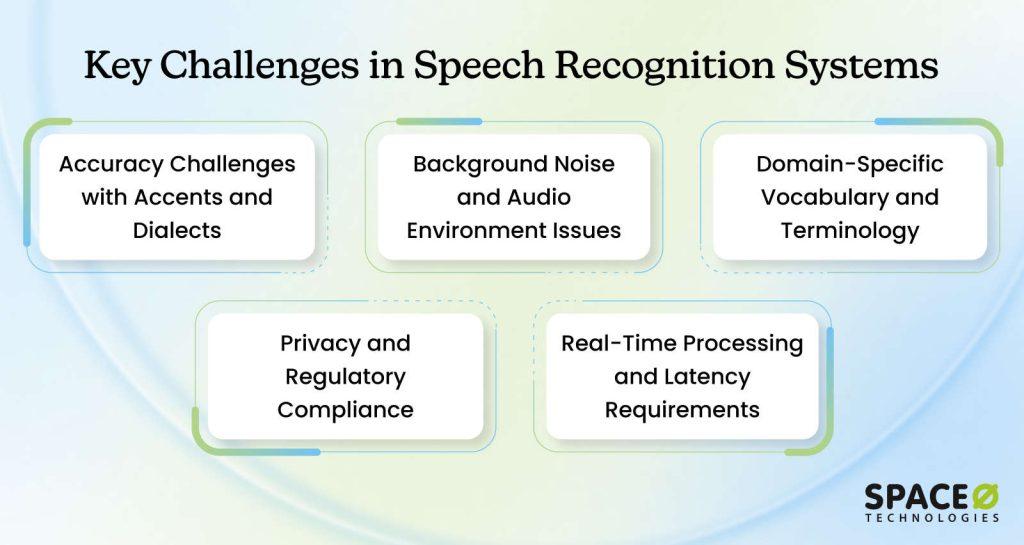
Speech recognition systems are powerful, but they face real limitations. Understanding these obstacles is crucial before implementation. The good news is that viable solutions exist for each challenge. Here’s how to address the most common hurdles.
1. Accuracy challenges with accents and dialects
Systems trained on standard English struggle with regional accents and non-native speakers. Pronunciation variations cause misrecognition across different English dialects and language regions globally.
Solutions
- Train models on diverse speaker datasets representing multiple accents and dialects
- Create accent-specific model variants for critical markets and regions
- Implement accent adaptation that adjusts recognition for individual speakers
- Use transfer learning to adapt pre-trained models for specific accent patterns
- Conduct regular testing across representative accent samples for quality assurance
2. Background noise and audio environment issues
Real-world environments introduce background noise, overlapping speech, and acoustic complexity. Call centers, hospitals, manufacturing floors, and vehicles present challenging audio conditions that degrade accuracy.
Solutions
- Deploy advanced noise reduction algorithms and speech enhancement techniques
- Train models on noisy audio samples representing actual deployment environments
- Use edge computing to process audio locally with contextual understanding
- Implement microphone arrays and directional audio capture systems
- Combine multiple processing techniques for optimal noise handling in specific environments
3. Domain-specific vocabulary and terminology
Generic systems don’t know specialized vocabulary in medical, legal, financial, or technical domains. Misrecognition of domain terminology requires expensive retraining or custom models.
Solutions
- Fine-tune models using domain-specific training data and terminology databases
- Create custom pronunciation dictionaries for industry jargon and specialized terms
- Implement domain-aware language models trained on relevant literature and documents
- Regularly update vocabulary lists as new terms and products emerge
- Partner with domain experts to ensure terminology accuracy and completeness
4. Privacy and regulatory compliance
Speech contains sensitive information, including personal data, medical histories, and financial details. GDPR, HIPAA, and other regulations impose strict data handling requirements on systems processing audio.
Solutions
- Deploy on-premise solutions where sensitive data never leaves organizational infrastructure
- Implement end-to-end encryption for audio transmission and storage
- Use edge computing to process audio locally rather than sending it to cloud servers
- Establish clear data retention policies with automatic deletion after specified periods
- Conduct regular security audits and compliance assessments with legal counsel
5. Real-time processing and latency requirements
Some applications require immediate response times, but complex models may introduce latency. Trade-offs exist between accuracy and speed, affecting user experience and adoption.
Solutions
- Select model architectures optimized for latency (RNN-T, streaming models)
- Deploy on edge devices to eliminate cloud network latency
- Implement model compression and quantization techniques for faster inference
- Use cascade approaches combining fast and accurate models based on complexity
- Monitor and optimize inference pipelines for specific deployment environments
How you address these challenges often depends on whether you rely on existing platforms or invest in a custom-built solution.
Build vs. Buy: Making the Right Decision for Your Business
Deciding whether to use existing platforms or build custom speech recognition systems is perhaps the most important choice you’ll make. This decision affects timeline, budget, long-term flexibility, and overall success. Understanding the trade-offs helps you choose the right path for your organization. AI consulting services provide strategic clarity on which approach aligns with your timeline, budget, and long-term objectives.
1. When pre-built solutions make sense
Best For: Organizations needing fast implementation, general-purpose speech recognition, and minimal ML expertise in-house.
Pre-built cloud services like Google Cloud Speech-to-Text, Microsoft Azure Speech Services, and similar platforms are designed for organizations that want immediate results without the complexity of custom development.
Ideal scenarios
- General-purpose speech recognition on relatively standard audio
- Accuracy requirements between 90–95% rather than 99%+
- Fast time-to-market measured in weeks, not months
- Limited machine learning expertise internally
- Prefer paying per-use rather than building infrastructure
Advantages
- Faster time-to-market with weeks of implementation
- Lower upfront investment and infrastructure costs
- Vendor support, updates, and maintenance included
- Proven reliability at massive scale across industries
- No need to hire specialized ML engineering teams
Disadvantages
- Higher per-minute costs at a significant scale
- Limited customization for specialized use cases
- Vendor lock-in and dependency on service availability
- Data privacy concerns with cloud-based processing
- Less control over model updates and performance
2. When custom development is justified
Best For: Organizations with specialized requirements, massive processing volumes, or compliance constraints requiring control. Custom development makes sense when pre-built solutions can’t meet your specific needs. This typically happens when your requirements diverge significantly from general-purpose use cases.
Ideal scenarios
- Mission-critical applications requiring 98%+ accuracy
- Specialized vocabulary and domain-specific terminology
- Challenging audio environments with significant background noise
- Privacy and compliance requirements demand on-premise deployment
- Processing massive volumes where per-use pricing becomes expensive
Advantages
- Full control over model architecture, training data, and updates
- Higher accuracy through domain-specific optimization
- Custom pronunciation dictionaries and language models tailored to your use case
- Greater flexibility to adapt models as business needs evolve
- Improved long-term cost efficiency at high usage volumes
- Stronger data privacy and regulatory compliance through controlled deployment
Disadvantages
- Higher upfront development and infrastructure costs
- Longer time-to-market, typically measured in months
- Requires in-house or partner ML engineering expertise
- Ongoing responsibility for model maintenance and retraining
- Infrastructure management for compute, storage, and scaling
- Greater implementation complexity compared to cloud-based services
Ultimately, the build-vs-buy decision depends on accuracy requirements, scale, compliance needs, and long-term cost considerations. Organizations that align this choice with their strategic goals are far more likely to achieve sustainable, high-impact speech recognition outcomes.
When choosing to build, hire AI developers with proven expertise to address the “requires in-house or partner ML engineering expertise” challenge.
Once the build-versus-buy decision is made, the next step is turning strategy into execution through a structured implementation plan.
Step-by-Step Implementation Roadmap for Speech Recognition Systems
Building a speech recognition system requires a structured, phased approach. Each phase builds on previous learnings and reduces risk by validating assumptions before major investments. This roadmap transforms strategy into actionable steps with clear deliverables and timelines.
Phase 1: Strategic assessment and readiness (Weeks 1–4)
Before any technical work begins, you need clarity on requirements, constraints, and organizational readiness. This phase establishes the foundation for all subsequent decisions. You’ll assess your current state, define what success looks like, and determine whether building or buying makes sense. Clear requirements and stakeholder alignment prevent costly mistakes later.
Action items
- Schedule workshops with key stakeholders to document specific use cases and pain points
- Create a detailed requirements matrix including accuracy targets, latency needs, and scale expectations
- Audit existing data sources and assess the quality and quantity of available training data
- Evaluate current IT infrastructure, including computing resources and security protocols
- Develop financial projections, including development costs, operational expenses, and expected ROI
Phase 2: Proof of concept development (Weeks 5–12)
The proof of concept validates technical feasibility without major investment. You work with real data from your environment, but on a limited scale. This phase answers critical questions: Can we achieve the accuracy we need? Will the technology solve our actual problem? Should we proceed to full development? Early learnings significantly reduce risk in later phases.
Action items
- Collect representative audio samples from your actual operational environment
- Hire experienced AI developers or partner with consultants for initial model development
- Prepare training data by transcribing and quality-assuring collected audio samples
- Train baseline models using transfer learning from pre-trained models
- Document accuracy metrics, performance characteristics, and technical limitations discovered
Phase 3: Production model development (Weeks 13–24)
With proof of concept validated, you transition to building production-quality systems. This phase focuses on scale, reliability, and integration with existing infrastructure. You expand training data significantly, implement robust error handling, and begin integrating with enterprise systems. The system moves from laboratory prototype to deployable asset.
Action items
- Expand the training dataset to 200–500 hours of quality transcribed audio across diverse conditions
- Develop APIs and integration points for connecting to existing business systems and workflows
- Implement comprehensive monitoring dashboards to track system health and performance
- Build security features, including encryption, access controls, and audit logging
- Create operational documentation, including troubleshooting guides and maintenance procedures
Phase 4: Pre-production testing and validation (Weeks 25-32)
Before deploying to production, the system must be thoroughly tested under realistic conditions. This phase includes load testing, security audits, compliance verification, and user acceptance testing. You validate that the system handles expected volumes, meets security requirements, and actually solves the problems it was designed to solve. Nothing moves to production without passing these gates.
Action items
- Execute load testing to verify the system handles expected user volumes and concurrent requests
- Conduct security assessments and penetration testing to identify vulnerabilities
- Verify compliance with regulatory requirements like HIPAA, GDPR, or industry-specific standards
- Run user acceptance testing with representative users from target departments
- Develop incident response procedures and rollback plans for production deployment
Phase 5: Phased production rollout (Weeks 33–40)
Production deployment happens gradually, not all at once. You deploy to a limited pilot group first, monitor carefully, and expand incrementally. This approach catches unexpected issues affecting small user groups rather than the entire organization. Real-world performance often differs from test environments, and gradual rollout lets you adjust before full deployment.
Action items
- Deploy the system to the pilot user group in a single facility or department
- Monitor system performance 24/7 and respond immediately to any issues
- Collect feedback from pilot users and document their experience
- Analyze real-world accuracy and performance compared to testing results
- Develop an expansion plan based on pilot learnings and prepare for broader deployment
Phase 6: Full production and continuous optimization (Weeks 41+)
Once fully deployed, the system enters steady state but requires ongoing attention. You monitor performance, gather feedback, retrain models regularly, and continuously improve based on real-world usage. Organizations that succeed with speech recognition treat it as a living system requiring regular maintenance and optimization, not a one-time implementation.
Action Items
- Establish monthly performance reviews, tracking accuracy, uptime, and user satisfaction metrics
- Schedule quarterly model retraining cycles to maintain accuracy as business conditions change
- Implement user feedback loops and prioritize improvements based on operational impact
- Conduct regular security audits and compliance checks to maintain security posture
- Track business metrics like cost savings and efficiency gains to justify ongoing investment
Partner with Our AI Experts to Build Production-Ready Speech Recognition
Space-O AI combines 15+ years of AI engineering experience with real-world implementation expertise to build secure, scalable, and high-accuracy speech recognition solutions.
Build an Enterprise-Grade Speech Recognition Solution with Space-O AI
Speech recognition software have transitioned from experimental technology to production-grade tools, transforming how organizations operate. Accuracy is impressive now. Economics are compelling. The barrier to entry has lowered dramatically with accessible cloud platforms and feasible custom development options.
Building speech recognition systems requires expertise beyond coding. You need partners who understand deployment complexity, how to manage organizational change, and can connect technology to real business outcomes. At Space-O AI, we bring 15+ years of experience in engineering high-quality, enterprise-grade AI solutions. Our team has completed 500+ projects and brings proven experience from healthcare, finance, manufacturing, and logistics sectors.
Our approach combines technical excellence with practical business focus. We identify where speech recognition creates the biggest value. We handle organizational adoption carefully and continuously refine systems post-deployment to maximize long-term results.
Ready to explore what speech recognition can do for your business? Contact our AI experts for consultation. We’ll review your business operations, pinpoint opportunities, estimate impact, and create a realistic implementation plan.
Frequently Asked Questions on Speech Recognition Software
1. How much does it cost to build a custom speech recognition system?
Custom speech recognition systems typically cost anywhere from about $25,000 for a basic MVP to $300,000+ for a full-featured, enterprise-grade solution. Costs depend on the accuracy targets, language support, training data needs, and integrations.
Advanced systems with domain-specific models, on-premise deployment, and high reliability often sit at the higher end of that range.
2. How long does it take to build a custom speech recognition system?
Building a custom speech recognition system typically takes 3 to 9 months, depending on complexity. Timelines vary based on data availability, accuracy targets, language support, and deployment requirements. Projects usually include planning, data preparation, model training, testing, integration, and production rollout phases.
3. Can I start with a pre-built platform and migrate to a custom system later?
Yes, many organizations adopt a hybrid approach, starting with pre-built platforms for quick validation. Once you’ve proven business value and understand specific requirements, you can migrate to custom development.
The learnings from pre-built platforms inform custom architecture decisions and reduce surprises during development. This phased approach spreads costs over time and reduces risk by validating assumptions before major investments.
4. How do I measure the success of a speech recognition implementation?
Track Word Error Rate as the primary accuracy metric. Monitor system uptime and availability against SLA targets. Measure user satisfaction through surveys and feedback. Quantify business impact through metrics like time savings, cost reduction, or customer satisfaction improvement. Compare actual results against project projections.
Establish baseline metrics before implementation to show clear improvement. Review performance monthly and adjust as needed based on real-world usage patterns.
5. What are the privacy and security considerations for speech recognition systems?
Speech recognition systems process sensitive voice data, which can contain personal or confidential information. Key considerations include data encryption, secure storage, access controls, anonymization, and compliance with regulations such as GDPR, HIPAA, or CCPA. Enterprises often choose on-premise or private cloud deployments to maintain full control over data handling.
6. What training data do I need for a custom speech recognition system?
A custom speech recognition system requires high-quality audio recordings paired with accurate transcriptions. Most production systems need 100–500+ hours of domain-relevant speech covering different speakers, accents, and environments. Domain-specific vocabulary and real-world audio conditions are critical to achieving high accuracy and reliable performance.
How often should I retrain or update my speech recognition models?
Retraining frequency depends on usage patterns, accuracy drift, and business changes. Most production systems benefit from retraining every 3–6 months, or sooner when new accents, vocabulary, or environments are introduced. Regular updates help maintain accuracy, adapt to real-world usage, and prevent performance degradation over time.


Build Custom Speech Recognition Solutions
What to read next