- What Is a Multi-Agent System?
- Why Use LangChain for Multi-Agent Systems?
- Core Components of a LangChain Multi-Agent System
- Types of Multi-Agent Architectures in LangChain
- Hierarchical architecture
- How LangGraph Powers Multi-Agent Workflows
- How to Build a LangChain Multi-Agent System: Step by Step
- Real-World Use Cases of LangChain Multi-Agent Systems
- Best Practices for Building LangChain Multi-Agent Systems
- Challenges in Implementing LangChain Multi-Agent Systems
- Build Your LangChain Multi-Agent System With Space-O AI
- Frequently Asked Questions on LangChain Multi-Agent Systems
LangChain Multi-Agent System: A Complete Guide to Building and Orchestrating AI Agents

 Last Updated: April, 13 2026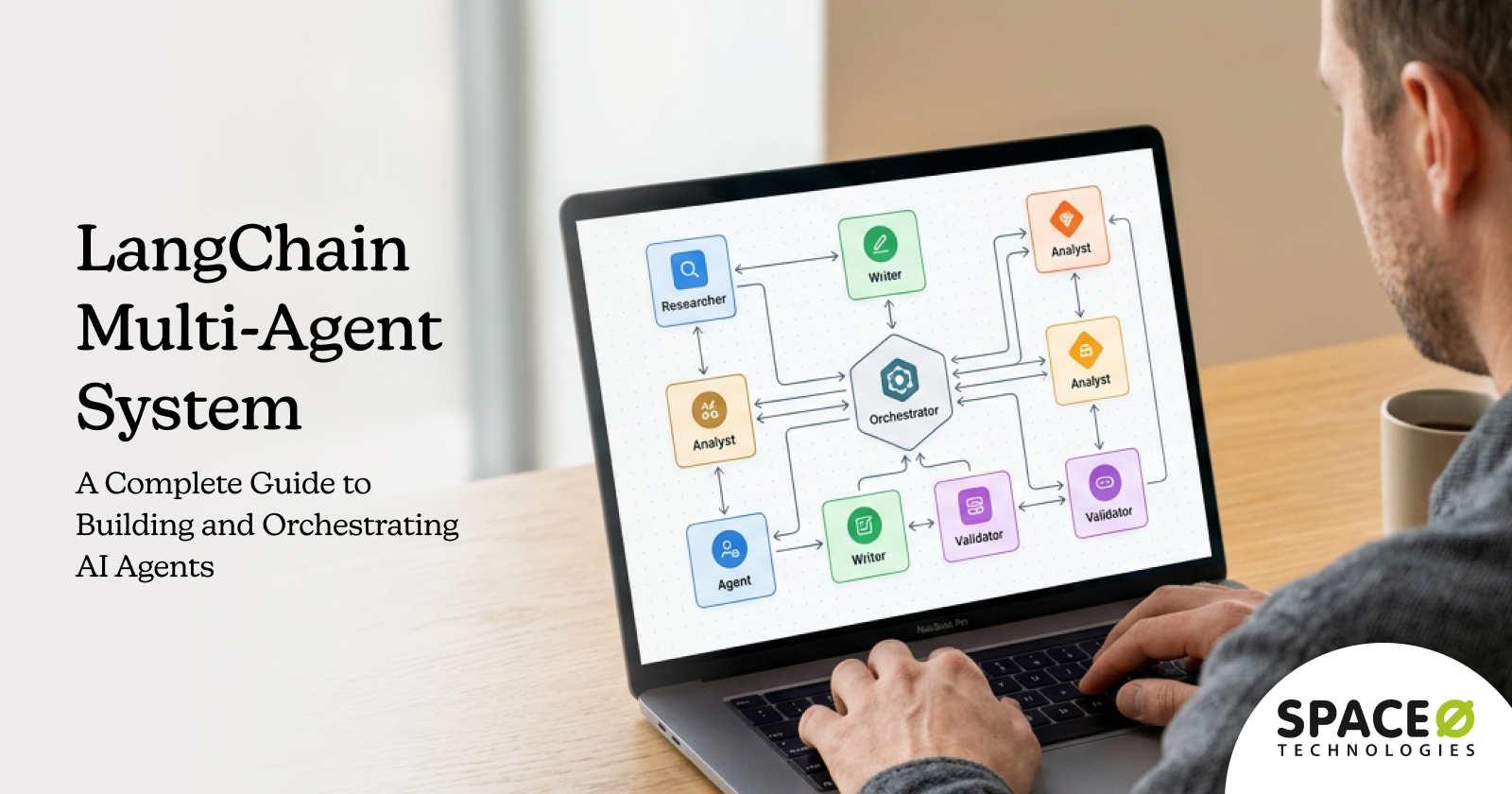
Most AI implementations fail not because the models are weak, but because a single agent trying to research, reason, write, review, and decide all at once hits its ceiling fast. A LangChain multi-agent system solves this by distributing work across specialized AI agents that each handle what they do best, the same way a high-performing team does.
According to MarketsandMarkets, the global AI agents market is projected to grow from $5.1 billion in 2024 to $47.1 billion by 2030, expanding at a CAGR of 44.8%. This growth reflects how rapidly organizations are moving from single-model AI to coordinated, multi-agent architectures that can handle real business complexity.
The challenge is not finding a framework. It’s building multi-agent systems that are reliable, stateful, and production-ready. That is where LangChain, combined with its graph-based extension LangGraph, stands apart from alternatives.
As a leading LangChain development services provider, we have helped businesses design and deploy LangChain-based agent systems that automate workflows, reduce manual intervention, and scale reliably in production. This guide covers everything you need to know, from core concepts and architecture patterns to a step-by-step build guide, real-world use cases, and a framework comparison.
Let’s start by understanding what a multi-agent system actually is.
What Is a Multi-Agent System?
A multi-agent system is a network of autonomous AI agents, each assigned a specific role, that work together toward a shared or distributed goal. Unlike single-agent architectures where one model handles every task sequentially, multi-agent systems divide responsibilities across specialized units, allowing complex workflows to run faster, more reliably, and at greater depth.
Think of it like a software development team. A project manager breaks down requirements, a developer writes the code, a QA engineer tests it, and a reviewer approves it. Each member focuses on their domain. Multi-agent AI systems work the same way, with each agent contributing its specialty to the final output rather than one overloaded model handling everything.
Key characteristics that define a multi-agent system:
- Autonomy — Each agent reasons and acts independently within its defined scope
- Specialization — Agents are built for specific tasks such as search, summarization, code generation, or review
- Communication — Agents pass outputs, context, and instructions to one another through structured message handoffs
- Coordination — An orchestrator or supervisor routes tasks and manages the overall workflow state
Now that you understand what a multi-agent system is, let’s explore why LangChain is the right framework for building one.
Why Use LangChain for Multi-Agent Systems?
LangChain is an open-source framework for building LLM-powered applications. Its modular, composable architecture covering tools, memory, chains, and agents makes it significantly easier to build, test, and deploy multi-agent systems compared to building from scratch.
Here are the key reasons why LangChain is the preferred framework for building multi-agent systems:
Modular tool integration
LangChain provides a rich, ready-to-use tool ecosystem covering web search, database queries, code execution, REST APIs, and document retrieval. Adding or swapping tools across agents requires minimal code changes, making multi-agent systems faster to build and easier to maintain.
Flexible memory management
LangChain supports multiple memory types, from ConversationBufferMemory for short sessions to VectorStore memory for semantic retrieval. In multi-agent systems, memory can be shared across agents so each agent maintains a consistent context without requiring repeated LLM calls.
Support for multiple LLM backends
LangChain is LLM-agnostic. You can assign different models to different agents, a large, capable model for the supervisor and smaller, faster models for worker agents, without changing your orchestration logic. Supported backends include OpenAI, Anthropic, Google, Meta Llama, Mistral, and Hugging Face models.
Graph-based orchestration with LangGraph
LangGraph extends LangChain with a stateful, graph-based execution model that supports cyclical flows, conditional branching, parallel agent execution, and persistent checkpointing. This makes it the most production-ready orchestration layer available for complex multi-agent workflows.
Active ecosystem and community
LangChain is one of the most actively maintained AI frameworks, with frequent releases, extensive documentation, and a large community. This means faster access to new LLM capabilities, better debugging resources, and lower long-term maintenance risk compared to less-adopted alternatives.
While alternatives like CrewAI and AutoGen exist, LangChain, combined with LangGraph, offers the most production-ready architecture for complex, stateful multi-agent systems that need real-world reliability.
Before you start building, it helps to understand the individual components that every LangChain multi-agent system is built from.
Ready to Build a Production-Ready LangChain System for Your Business?
Space-O AI’s engineers have deployed LangChain-based solutions across enterprise, healthcare, fintech, and SaaS sectors. Tell us what you need, and we will get started.
Core Components of a LangChain Multi-Agent System
Every LangChain multi-agent system is assembled from six core components that work together to enable coordination, memory, and task execution. Understanding each one before you build will save significant debugging time later.
Agents
An agent is an LLM-powered unit that uses a reasoning loop to decide which tool to call and when. LangChain supports two primary reasoning patterns:
- ReAct — The agent reasons step-by-step, interleaving thought and action in a loop until it reaches a final answer
- Plan-and-Execute — The agent first creates a full plan, then executes each step. This pattern works better for multi-step tasks with a predictable structure
Each agent has a defined role, a system prompt that scopes its behavior, and a set of tools it can invoke. Keeping agent roles narrow is the single most important factor in building reliable multi-agent systems.
Tools
Tools are functions or APIs that agents can call to act in the world. LangChain’s @tool decorator makes it straightforward to wrap any Python function as a tool.
- Examples: web search, code execution, database queries, calculator, document retrieval, external APIs
- Agents use the tool’s name and docstring to determine when and how to invoke it. Clear, descriptive docstrings are critical.
Memory
Memory determines how much context each agent retains across a conversation or workflow. LangChain’s memory modules support four key types:
- ConversationBufferMemory — Stores full conversation history (best for short sessions)
- ConversationSummaryMemory — Compresses long conversations into summaries to stay within context limits
- VectorStore memory — Retrieves semantically relevant context from past interactions
- Shared memory — Allows multiple agents to read from and write to the same memory object, enabling continuity across the workflow
For retrieval-heavy workflows, our guide on LangChain RAG development covers how to extend agent memory with document-level semantic search.
Orchestrator / Supervisor Agent
The supervisor is a controller agent that receives incoming tasks, determines which sub-agent is best suited for each subtask, and routes work accordingly. In LangGraph, the supervisor is implemented as a node that calls sub-agents as tools or triggers them as separate graph nodes.
State Management
LangGraph manages application state as a shared TypedDict object, a snapshot of all relevant data at any point in the workflow. Agents read from and write to this shared state rather than passing messages directly, enabling clean data flow without redundant LLM calls.
Message Passing
Agents communicate through structured message handoffs. In a supervisor pattern, only the supervisor interacts with the user while sub-agents function as tools. In a peer-to-peer pattern, agents pass control directly to one another through LangGraph’s edge system.
With the building blocks clear, let’s look at the different ways these components can be arranged into multi-agent architectures.
Types of Multi-Agent Architectures in LangChain
LangChain and LangGraph support several orchestration patterns. Choosing the right architecture depends on your workflow’s complexity, how tightly agents need to collaborate, and how much centralized control you need.
Supervisor architecture
Best for: Centralized control with specialized workers. This is the most common production pattern for customer support, content generation, and research automation.
A single controller agent receives all incoming tasks and delegates subtasks to specialized sub-agents. The supervisor synthesizes their outputs and returns a consolidated result to the user.
How it works:
- The supervisor receives the user input and determines task routing
- It invokes the appropriate sub-agent, either as a tool call or a graph node transition
- Sub-agents complete their tasks and return results to the supervisor
- The supervisor integrates outputs and generates the final response
Hierarchical architecture
Best for: Enterprise-scale automation where the number of agents and task types is too large for a single supervisor to manage effectively.
An extension of the supervisor model, hierarchical architectures introduce intermediate team lead agents between the top-level supervisor and worker agents. A top-level supervisor manages team leads, each of which manages a cluster of specialized workers.
How it works:
- Top-level supervisor decomposes a high-level goal into domain-level tasks
- Domain team leads further break down tasks and coordinate their worker agents
- Worker agents execute atomic tasks and report back up the hierarchy
Peer-to-peer (collaborative) architecture
Best for: Creative, exploratory, or loosely defined workflows where rigid task routing would create unnecessary friction.
Agents communicate directly with each other without a central controller. Any agent can initiate a handoff to a peer based on task context.
How it works:
- Each agent has awareness of what peer agents can do
- When a task falls outside an agent’s scope, it hands off directly to the appropriate peer
- No central orchestrator. Agents self-coordinate through a shared state.
Sequential pipeline architecture
Best for: Document processing, report generation, ETL-style AI pipelines, and any workflow with a predictable, linear task structure.
Agents work in a fixed, linear order. The output of one agent becomes the direct input for the next, with no branching or looping.
How it works:
- Input flows through a predefined chain of agents in order
- Each agent performs its step and passes its output downstream
- The final agent in the chain produces the workflow result
Now that you know the available architecture patterns, let’s look at the engine that makes stateful multi-agent workflows possible in LangChain.
Need Help Choosing the Right Multi-Agent Architecture for Your Use Case?
Space-O AI maps your business workflows to the right LangChain architecture pattern and builds it to production-ready standards from the ground up.
How LangGraph Powers Multi-Agent Workflows
LangGraph is LangChain’s graph-based orchestration extension, built specifically for stateful, cyclical multi-agent workflows. Plain LangChain chains work well for simple sequences, but when you need agents to loop back, branch conditionally, or share state, LangGraph is the answer.
LangGraph models agent workflows as a directed graph built from three key components:
- State — A shared TypedDict object that holds the current snapshot of the application, including user input, tool results, intermediate outputs, and routing decisions
- Nodes — Python functions or agent invocations that transform the state at each step
- Edges — Functions that determine which node executes next, supporting both fixed transitions and conditional branching
Why LangGraph over plain LangChain chains?
LangGraph supports cyclical flows where agents can revisit a step based on output, conditional branching to route to different agents depending on state, and parallel execution to trigger multiple agent nodes simultaneously. It also includes a checkpointing system for persistent state management across sessions, which is critical for production deployments.
For memory, LangGraph’s built-in checkpointers include MemorySaver for development, and SqliteSaver or PostgresSaver for production. These enable full conversation persistence and resumable workflows without custom infrastructure.
Simple two-agent LangGraph workflow (supervisor + worker pattern):
python

from langgraph.graph import StateGraph, END

from typing import TypedDict

class AgentState(TypedDict):

    task: str

    result: str

    next: str

def supervisor_node(state: AgentState):

    if "research" in state["task"]:

        return {"next": "research_agent"}

    return {"next": "writer_agent"}

def research_agent_node(state: AgentState):

    return {"result": f"Research output for: {state['task']}", "next": END}

def writer_agent_node(state: AgentState):

    return {"result": f"Written content for: {state['task']}", "next": END}

workflow = StateGraph(AgentState)

workflow.add_node("supervisor", supervisor_node)

workflow.add_node("research_agent", research_agent_node)

workflow.add_node("writer_agent", writer_agent_node)

workflow.set_entry_point("supervisor")

workflow.add_conditional_edges("supervisor", lambda s: s["next"])

graph = workflow.compile()
With LangGraph’s role clear, let’s walk through how to put all of this together and build a working multi-agent system from scratch.
How to Build a LangChain Multi-Agent System: Step by Step
Building a LangChain multi-agent system follows a structured flow, from environment setup to running a full agent graph. Each step below builds on the previous one.
Step 1: Set up your environment
Install the necessary libraries and configure your LLM provider credentials before writing any agent logic. If your team is new to LangChain or short on bandwidth, you can hire LangChain developers on a dedicated model to handle setup, architecture, and build execution from day one.
Action items:
- Run pip install langchain langgraph langchain-openai
- Set OPENAI_API_KEY (or your preferred LLM provider key) as an environment variable
- Import core modules: StateGraph, ChatOpenAI, tool, MemorySaver, END
- Optionally install langsmith for observability and debugging from day one
Step 2: Define your agent tools
Tools give agents the ability to act beyond the LLM’s knowledge, searching the web, querying databases, or running code. LangChain’s @tool decorator wraps any Python function into a callable tool.
Action items:
- Write tools using the @tool decorator with clear, descriptive docstrings
- Keep each tool narrowly scoped to one action. Agents use docstrings to decide when to invoke.
- Test each tool independently before wiring it into an agent
python

from langchain_core.tools import tool

@tool

def web_search(query: str) -> str:

    """Search the web for current information on a given topic."""

    return f"Search results for: {query}"

@tool

def summarize_text(text: str) -> str:

    """Summarize a long piece of text into a concise paragraph."""

    return f"Summary: {text[:100]}..."
Step 3: Create individual agents
Each agent needs an LLM backbone, a set of tools, and a system prompt that defines its role and boundaries precisely.
Action items:
- Instantiate ChatOpenAI for each agent. For a full configuration walkthrough, see our guide on LangChain OpenAI integration.
- Bind tools to the agent using .bind_tools([tool_list])
- Write system prompts that define the agent’s role explicitly and restrict out-of-scope behavior
- Wrap each agent in a node function that reads from and writes to the shared AgentState
Step 4: Build the supervisor agent
The supervisor receives the user task, determines which sub-agent to call, and synthesizes results. In LangGraph, this is implemented as a node with conditional outgoing edges.
Action items:
- Create a supervisor LLM prompt that lists available sub-agents and their responsibilities
- Define a routing function that maps supervisor decisions to graph node names
- Add the supervisor as the entry point of the StateGraph
- Use add_conditional_edges to route based on the supervisor’s output
Step 5: Define the state graph
The state graph connects all agents as nodes, defines how they communicate, and controls workflow execution.
Action items:
- Define your AgentState TypedDict with all fields that agents will read or write
- Add each agent as a node using workflow.add_node(“agent_name”, agent_function)
- Add edges, both fixed (add_edge) and conditional (add_conditional_edges), between nodes
- Set the supervisor as the entry point for the workflow.set_entry_point(“supervisor”)
- Compile the graph: graph = workflow.compile(checkpointer=MemorySaver())
Step 6: Run the workflow
Invoke the compiled graph with your input and a thread ID for session persistence. Use LangSmith to trace the agent decision path for debugging.
Action items:
- Invoke the graph: graph.invoke({“task”: “your input”}, config={“configurable”: {“thread_id”: “1”}})
- Enable LangSmith tracing by setting LANGCHAIN_TRACING_V2=true and your LANGCHAIN_API_KEY
- Review the execution trace to verify each agent’s decision path
- Test edge cases. What happens when the supervisor receives an ambiguous task?
Multi-agent systems deliver the most business value when applied to the right workflows. Here are six real-world use cases where they are already driving measurable results.
Build Your LangChain Multi-Agent System With Expert Guidance
Space-O AI’s engineers have built production-ready multi-agent systems for enterprises across industries. Share your workflow requirements and get a custom development plan.
Real-World Use Cases of LangChain Multi-Agent Systems
A LangChain multi-agent system delivers the most value in workflows that are too complex, too long, or too multi-disciplinary for a single agent to handle reliably. Here are six high-impact use cases where multi-agent architectures are driving measurable results.
Customer support automation
Customer support teams handle a mix of simple FAQs, complex troubleshooting, and escalations all at once. A multi-agent system handles this by splitting responsibilities: a triage agent classifies the incoming issue, a resolution agent retrieves knowledge base answers, and an escalation agent routes unresolved or high-priority tickets to human support. For a deeper look at building support-specific solutions, see our guide on LangChain chatbot development.
Agent setup:
- Triage agent — classifies issue type and urgency from the customer message
- Resolution agent — retrieves knowledge base answers and generates responses
- Escalation agent — determines when to hand off to a human, with full context preserved
Business impact:
- Automates the resolution of routine inquiries without human involvement
- Reduces average response time from hours to seconds for common issues
- Preserves escalation quality by passing the full conversation context to human agents
Software development assistance
Software development involves distinct phases, including planning, coding, and reviewing, each require different types of reasoning. A planner agent breaks down the feature requirement into tasks, a coder agent writes the implementation, and a reviewer agent runs static analysis and flags improvements.
Agent setup:
- Planner agent — decomposes the requirement into discrete implementation steps
- Coder agent — generates code for each step using tools like a Python REPL
- Reviewer agent — reviews code output for bugs, security issues, and best practices
Business impact:
- Accelerates first-draft code generation for new features
- Catches common errors before human review, reducing review cycles
- Produces structured development artifacts such as plans, code, and review notes automatically
Research and report generation
Research workflows require sourcing information, synthesizing findings, and producing structured outputs, which are three distinct tasks. A search agent retrieves sources from the web, a summarizer agent condenses findings, and a writer agent produces a structured report.
Agent setup:
- Search agent — performs web searches and retrieves relevant documents
- Summarizer agent — extracts key findings from retrieved content
- Writer agent — assembles findings into a structured, well-formatted report
Business impact:
- Compresses research workflows from hours to minutes
- Ensures reports are grounded in retrieved sources rather than LLM hallucinations
- Scales research capacity without proportionally scaling headcount
E-commerce operations
E-commerce operations involve parallel workflows, including inventory monitoring, pricing adjustments, and logistics coordination that previously required separate systems and manual coordination. A multi-agent setup runs all three simultaneously through a shared LangGraph state.
Agent setup:
- Inventory agent — monitors stock levels and triggers reorder alerts
- Pricing agent — adjusts prices based on demand signals and competitor data
- Logistics agent — triggers fulfillment actions and tracks order status
Business impact:
- Enables real-time operational responses without manual intervention
- Reduces out-of-stock incidents through proactive inventory monitoring
- Improves margin management through automated pricing adjustments
Healthcare triage
Healthcare intake workflows involve symptom collection, clinical guidance retrieval, and appointment scheduling, each requiring specialized logic. A multi-agent system handles this end-to-end while keeping each step within safe, well-scoped boundaries.
Agent setup:
- Symptom checker agent — collects and structures patient-reported symptoms
- Diagnosis-support agent — retrieves relevant clinical guidelines (not a substitute for clinical judgment)
- Appointment-scheduling agent — books the next available slot based on urgency
Business impact:
- Reduces administrative burden on front-desk and clinical staff
- Improves patient intake speed for non-emergency cases
- Ensures structured handoff to clinical staff with full intake summary
Financial analysis
Financial reporting involves data retrieval, quantitative analysis, and a written narrative, three tasks that rarely happen simultaneously in manual workflows. A multi-agent system compresses this into a single automated pipeline.
Agent setup:
- Data retrieval agent — pulls market data, financial statements, or portfolio metrics
- Analysis agent — identifies trends, anomalies, and key metrics from raw data
- Report-drafting agent — compiles insights into an executive summary with narrative
Business impact:
- Accelerates reporting cycles from days to hours
- Ensures analysis is always grounded in the latest retrieved data
- Produces a consistent report structure across reporting periods
Knowing the use cases is one part of the picture. Building them reliably in production requires following a set of proven practices.
Best Practices for Building LangChain Multi-Agent Systems
Building multi-agent systems that work reliably in production requires more than connecting agents in a graph. These best practices reduce debugging time, improve output quality, and protect against common failure modes.
Define clear role boundaries for each agent
Each agent should have a focused system prompt with an explicit scope. Overlapping responsibilities create unpredictable behavior because two agents may attempt to handle the same subtask differently. When in doubt, make each agent more specialized rather than more general.
Use structured outputs for inter-agent communication
Implement Pydantic models to define the data structure agents pass to each other. Unstructured string outputs between agents are a leading cause of downstream failures. Typed, validated schemas eliminate this class of error.
Implement human-in-the-loop checkpoints
For workflows involving high-stakes decisions, add checkpoint nodes where a human can review and approve before the workflow proceeds. LangGraph supports this natively through its interrupt_before mechanism.
Monitor with LangSmith from day one
LangSmith provides full tracing of agent decision paths, tool calls, and token usage across the entire workflow. Integrating it from the start, not as an afterthought, makes debugging multi-agent failures significantly faster.
Start with two or three agents, then scale
Build and validate a minimal working system before expanding to complex topologies. Every agent added multiplies the debugging surface area. Validate each agent’s behavior in isolation before testing it within the full graph.
Handle agent failures gracefully
Implement retry logic for transient tool failures and define fallback agents for cases where the primary agent cannot resolve a task. A single agent failure should not bring down the entire workflow.
For a broader look at how LangChain handles end-to-end process automation, see our guide on LangChain workflow automation.
Even with best practices in place, multi-agent systems come with trade-offs. Here is what to plan for before you go to production.
Challenges in Implementing LangChain Multi-Agent Systems
Multi-agent systems add significant power to AI workflows, but they also introduce trade-offs that are important to plan for before deployment.
Challenge 1: Latency from multiple LLM calls
Every agent invocation is an LLM API call. In a five-agent sequential pipeline, you’re making at least five API calls, each adding hundreds of milliseconds to total response time. In production, these compounds cause user-facing delays that impact experience.
Solutions:
- Use parallel agent execution wherever tasks are independent of each other
- Cache deterministic tool outputs to avoid redundant API calls
- Use smaller, faster models for simpler sub-agents and reserve large models for complex reasoning steps
Challenge 2: Cost from increased token usage
More agents mean more tokens consumed per workflow execution. System prompts, conversation history, and tool outputs all contribute to token usage, and costs scale quickly at production volume.
Solutions:
- Optimize system prompts to be concise without losing clarity
- Use ConversationSummaryMemory to compress long histories instead of passing full context
- Set explicit token budgets per agent and monitor usage with LangSmith
Challenge 3: Debugging complexity across agent chains
When a multi-agent workflow fails, the error could originate from any node in the graph. Tracing failures across chained agents without observability tooling is extremely difficult, especially when failures are intermittent.
Solutions:
- Integrate LangSmith from day one to capture full agent traces
- Add structured logging at each node’s entry and exit points
- Write unit tests for individual agent nodes before testing the full workflow
Challenge 4: Prompt sensitivity cascading across agents
A small change to one agent’s system prompt can change its output format, which then causes a downstream agent to fail because it receives unexpected input. This cascading fragility is one of the most common production issues in multi-agent systems.
Solutions:
- Version-control all agent system prompts alongside your code
- Use structured outputs (Pydantic) to make inter-agent contracts explicit and validated
- Run regression tests against known inputs after any prompt change
Challenge 5: Context window growth in long workflows
Shared state grows as the workflow progresses. In long-running or multi-turn workflows, the accumulated state can exceed an LLM’s context window limit, causing truncation or errors.
Solutions:
- Prune irrelevant state fields at designated checkpoints in the graph
- Use summarization at intermediate steps to compress the accumulated context
- Design state schemas to carry only what downstream agents actually need
Still Evaluating Whether a Multi-Agent System Is Right for Your Business?
Space-O AI offers a no-obligation workflow assessment to help you identify exactly where multi-agent AI will deliver the highest ROI for your operations.
Build Your LangChain Multi-Agent System With Space-O AI
A LangChain multi-agent system transforms what’s possible with AI automation, from single-task runners to coordinated, production-grade workflows that mirror how high-performing teams operate. With LangGraph providing stateful orchestration, LangSmith enabling observability, and LangChain’s rich tool ecosystem as the foundation, you have everything you need to build complex agent systems that actually work in production.
That is where Space-O AI comes in. With 15+ years of enterprise software development experience and 500+ AI projects delivered across healthcare, fintech, SaaS, and enterprise sectors, our team has the depth to build LangChain multi-agent systems that work reliably in production, not just in demos.
We handle architecture design, LangGraph workflow engineering, LLM integration, and production deployment so your team can focus on business outcomes, not infrastructure. Our 99.9% system uptime and 97% client retention reflect what happens when you build things right the first time.Ready to build your LangChain multi-agent system? Contact Space-O AI today for a free consultation. Our experts will assess your workflow requirements, define your agent architecture, and deliver a project estimate within 24 hours. With 97% client retention, we are confident you will stay.
Frequently Asked Questions on LangChain Multi-Agent Systems
What is a multi-agent system in LangChain?
A LangChain multi-agent system is a network of specialized AI agents, each powered by an LLM, that work together to complete complex tasks by dividing responsibilities and communicating through a shared state or message-passing system. LangGraph is the recommended framework for building stateful multi-agent systems within the LangChain ecosystem.
How is LangGraph different from LangChain?
LangChain is the core framework for building LLM-powered applications. LangGraph is an extension of LangChain that adds graph-based state machines for building stateful, cyclic, multi-agent workflows. Standard LangChain chains are linear and stateless; LangGraph supports looping, branching, parallelism, and persistent checkpointing.
Can LangChain multi-agent systems run agents in parallel?
Yes. LangGraph supports parallel execution by allowing multiple agent nodes to be triggered simultaneously from a single parent node. This is particularly valuable for workflows where independent subtasks, such as searching multiple data sources, can run concurrently without waiting for each other.
What LLMs are supported in LangChain agents?
LangChain supports a broad range of LLM backends, including OpenAI (GPT-4o, o3), Anthropic (Claude), Google (Gemini), Meta (Llama), Mistral, Cohere, and any model accessible via Hugging Face or a custom API endpoint. Agents can be configured to use different LLMs based on task complexity and cost requirements.
Is a LangChain multi-agent system suitable for production?
Yes, especially when built with LangGraph for orchestration, LangSmith for observability, and persistent checkpointers like PostgresSaver for session management. LangChain’s architecture is explicitly designed for production-grade, enterprise-scale agent deployments with reliability and scalability as primary design goals.


Want to Build a Multi-Agent AI System for Your Business?
What to read next