- What Is a Data Pipeline?
- The core components of any data pipeline
- Types of data pipelines: Batch, streaming, and hybrid
- Why You Need a Data Pipeline Right Now
- Key Obstacles to Consider Before You Start Building a Data Pipeline
- The 7-Step Framework to Build a Data Pipeline
- Step 1: Define clear objectives and success metrics
- Step 2: Identify and audit data sources
- Step 3: Design scalable architecture
- Step 4: Design data ingestion strategy
- Step 5: Define transformations and data preparation
- Step 6: Choose storage and set up access patterns
- Step 7: Monitor, alert, and optimize
- Real-World Use Cases Across Industries
- Tools and Technologies for Building Data Pipelines
- Build Reliable Data Pipelines for Data Driven Success
- Frequently Asked Questions About Data Pipelines
How to Build a Data Pipeline: Complete Process

 Last Updated: December, 5 2025
Building a reliable data pipeline is one of the most important steps in unlocking the full value of your business data. Whether you want to generate real time insights, power your analytics dashboards, or prepare high quality data for AI and machine learning, you need a structured system that can move, process, and deliver data where it is needed.
According to Gartner, 60% of AI projects will be abandoned by 2026 without proper data pipeline infrastructure and AI ready data practices. This shows how critical a strong data foundation has become for any modern AI or analytics initiative.
A well designed pipeline automates the flow of data from various sources, ensures accuracy, handles transformations, and keeps everything running at scale. With more companies shifting toward data driven decision making, the demand for modern, automated pipelines that can handle large volumes of data has never been higher.
Whether you hire AI developers from an outsourcing agency or build an in-house team, they’ll need clean, organized data to build reliable models. Quality pipelines ensure quality training data, which means better models and successful AI initiatives.
In this guide, you will learn how a data pipeline works, the components involved, the tools you can use, and a step by step process to build your own. Whether you are a developer, data engineer, or someone planning a new analytics or AI initiative, this guide will help you understand what it takes to design a pipeline that is dependable, scalable, and future ready.
What Is a Data Pipeline?
A data pipeline is a system that moves data from one place to another, typically from multiple sources into a central destination where it can be stored, processed, and used for analytics, reporting, or AI. It automates the entire flow of data so teams do not have to manually extract files, clean them, or load them into databases.
Instead, the pipeline ensures that data is collected, transformed, and delivered reliably and consistently. A data pipeline ingests raw data, applies necessary transformations, and sends the refined data to a storage or analytics system. Its main purpose is to make sure the right data reaches the right system in the right format at the right time.
The core components of any data pipeline
Every data pipeline has four essential parts. Each plays a specific role in moving data from raw to actionable.
1. Ingestion layer
This is where data enters your system. Sources can vary wildly: databases, APIs, IoT sensors, file uploads, and real-time event streams. The ingestion layer connects to these diverse sources and pulls data in according to a schedule or in real time.
2. Processing layer
Raw data is messy. This layer cleans it, validates it, and transforms it. Duplicates get removed. Missing values get handled. Data gets standardized into consistent formats. Business logic gets applied. Enrichment happens here.
3. Storage layer
Processed data has to live somewhere. Whether it’s a data warehouse like Snowflake, a data lake on AWS S3, or a cloud database, this layer stores your data in a format optimized for access and analysis.
4. Consumption layer
Finally, processed data reaches the people and systems that use it. Analysts query it with SQL. Dashboards pull from it for visualization. Machine learning models use it for training or real-time inference. APIs expose it to applications.
Types of data pipelines: Batch, streaming, and hybrid
Different business needs require different pipeline approaches. Your choice depends on how fresh your data needs to be and how complex your infrastructure can be.
1. Batch pipelines
Batch pipelines process data in scheduled chunks. A batch job might run every night, processing all transactions from the past 24 hours. By morning, reports are ready. Batch pipelines are excellent for analytics and historical analysis. They’re also simpler to build and maintain.
2. Streaming pipelines
Streaming pipelines process data continuously as it arrives. When someone makes a payment, fraud detection models score it immediately. When a server logs an error, alerts trigger in real time. Streaming pipelines power real-time dashboards, anomaly detection, and operational monitoring.
3. Hybrid pipelines
Hybrid pipelines combine both approaches. A manufacturer might stream sensor data for real-time alerts when equipment malfunctions, while also running nightly batch jobs that aggregate sensor data for trend analysis. This hybrid approach captures the benefits of both.
For organizations building machine learning systems, streaming pipelines increasingly matter. Models making predictions in real time need continuous feature updates. But batch pipelines remain essential for training historical data.
Understanding pipeline types is step one. But before you invest time and resources, you need to know where they deliver the biggest business impact. Here’s what you should consider.
Scale Your Data Workflows with Space-O AI
From ingestion to transformation and orchestration, our team helps you create pipelines that are scalable, automated, and reliable. Let our experts streamline your data operations.
Why You Need a Data Pipeline Right Now
The business case for building data pipelines keeps strengthening. Here’s why it matters for your organization today.
According to Gartner research, poor data quality costs organizations an average of $12.9 million per year. That’s not just a financial hit. It also increases the complexity of data ecosystems, leads to poor decision-making, damages customer trust, and creates compliance risks. Quality data pipeline management prevents these issues by validating data at ingestion and maintaining high standards throughout the flow.
1. The time and money reality
Manual data processes are killers for business velocity. Consider a typical scenario. Your sales team needs to understand revenue trends by region. Without proper data pipeline development, this involves:
- Exporting data from your CRM (2 hours)
- Cleaning and reformatting in Excel (3 hours)
- Building a manual report (2 hours)
- Total: 7 hours of analyst time
With a data pipeline, that same report updates automatically every morning. Zero manual work. The analyst focuses on interpreting insights, not wrangling data.
At an $85,000 annual salary, one analyst spending 10 hours weekly on manual data work costs $40,000 annually. Scale that across your data and analytics teams, and the numbers grow fast. Studies show automated pipelines reduce manual data processing time by 40-60%. That frees teams to work on higher-value analysis and decision-making.
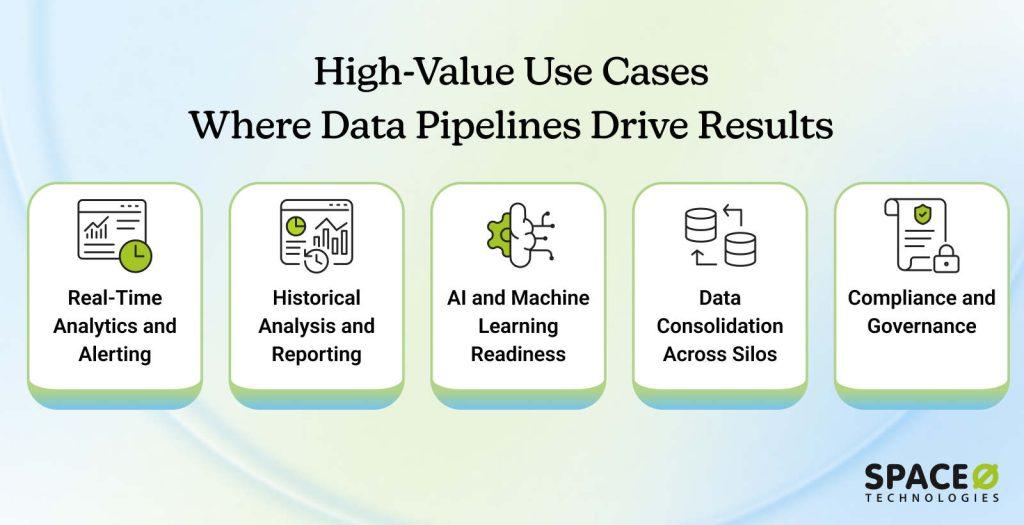
2. High-impact use cases where pipelines deliver value
Pipelines aren’t one-size-fits-all. Different use cases show different ROI. But the common thread is that effective pipeline infrastructure unlocks business value across industries.
2.1 Real-time analytics and alerting
Fraud detection systems need to score transactions instantly. Recommendation engines need to react to user behavior in milliseconds. Operational monitoring needs to catch system failures the moment they happen. Real-time pipelines make all of this possible.
2.2 Historical analysis and reporting
Sales trends, customer behavior patterns, and inventory forecasting. These require consolidated data across time. Data pipelines enable sophisticated analysis that spreadsheets simply can’t handle.
2.3 AI and machine learning readiness
Training machine learning models requires clean, consistent data. Feature engineering demands specific data formats. Model inference requires low-latency feature serving. Quality pipelines are non-negotiable for AI projects.
2.4 Data consolidation across silos
Most organizations have data scattered across dozens of systems. Customer data in the CRM. Transactional data in the ERP. Operational data in specialized systems. Pipelines bring all of that together into a unified view.
2.5 Compliance and governance
Regulated industries require audit trails, data lineage tracking, and access controls. Pipelines enable the infrastructure to meet these requirements reliably.
Ready to start building? Not so fast. The difference between a pipeline that thrives and one that breaks down comes down to one thing: preparation. Here’s what you need to anticipate.
Turn Raw Data into Actionable Insights With Our Expert Data Engineers
Space-O AI specializes in building and managing data pipelines that power analytics and machine learning. Partner with us to make your data ready for smarter business decisions.
Key Obstacles to Consider Before You Start Building a Data Pipeline
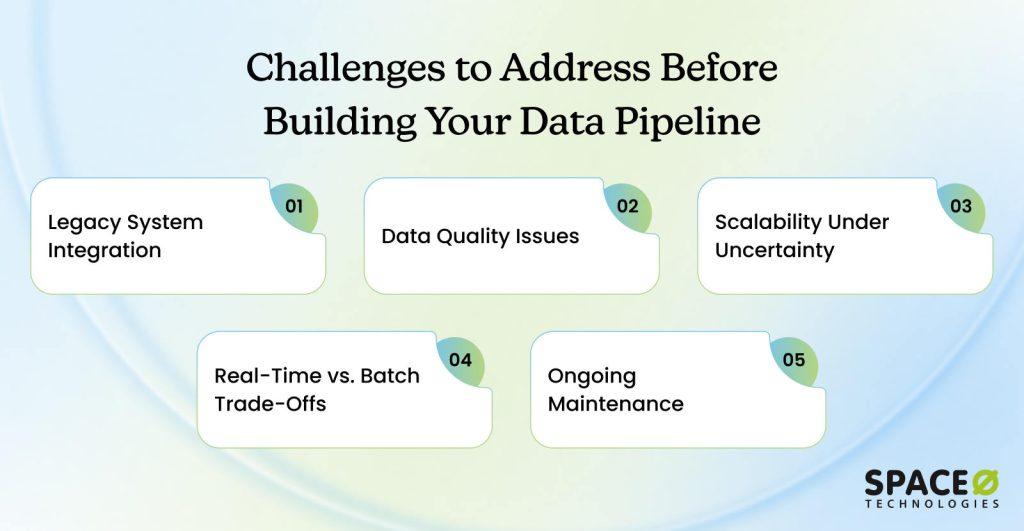
Understanding obstacles upfront prevents surprises later. Here are the real challenges organizations face. The key is knowing that these aren’t roadblocks, they’re predictable hurdles you can plan around.
1. Legacy system integration
Problem statement
Most organizations run on older systems, that an ERP from 2005, a CRM that’s barely been updated, and custom systems that nobody fully understands anymore. These legacy systems rarely have modern APIs, making data extraction complicated.
When schemas change, they break things. Security constraints also make connections difficult. Getting data out of these systems requires workarounds and specialized knowledge that your team may not have.
Solution
Plan for integration complexity upfront rather than assuming it will be simple. Use middleware solutions that handle translation between incompatible systems. Consider phased migration strategies that gradually move away from legacy systems. Sometimes you’ll need specialized connectors or custom extraction logic to bridge the gap between old and new systems.
2. Data quality issues
Problem statement
You’ve probably encountered this already. Data arrives incomplete, with fields filled with inconsistent values and duplicates scattered throughout. Missing dates, encoding problems, and naming inconsistencies plague most datasets. One source might have “United States,” while another has “US,” and yet another has “USA.”
When bad data corrupts your pipeline, it cascades downstream. It skews analytics, damages AI model performance, and erodes trust in your data systems. Teams stop using pipelines they don’t trust.
Solution
Implement validation at the ingestion point so problems surface immediately. Check that data matches expected schemas and verify that required fields exist. Catch duplicates early and build transformation logic that standardizes values across sources. Establish clear data quality standards upfront and measure them constantly. This prevents garbage data from polluting everything downstream.
3. Scalability under uncertainty
Problem statement
Your data volume will grow, maybe gradually, maybe suddenly. You don’t know exactly how much or how fast growth will happen. If you architect your pipeline for today’s volume, it will break under tomorrow’s load. Then you’re rebuilding everything in crisis mode while business operations suffer. Unplanned downtime is expensive and damages team credibility.
Solution
Design for 10x growth from the start, even if you can’t predict exact growth trajectories. Use cloud platforms that auto-scale without manual intervention. Choose distributed processing frameworks like Spark or Flink that handle scale naturally. Plan for modular architecture so you can upgrade individual components without tearing down the entire system.
4. Real-time vs. Batch trade-offs
Problem statement
Different business have different data needs. Real-time streaming gives you current data but requires complex infrastructure and careful engineering. Batch processing is simpler to build and maintain, but it means delayed data that’s hours or days old.
Most organizations actually need both approaches. Streaming for operational alerts and immediate decisions. Batch for comprehensive analytics and reporting.
Solution
Build hybrid architectures that handle both simultaneously. Some organizations use Lambda architecture with separate batch and streaming layers handling the same data differently. Others use Kappa architecture with a single streaming engine that handles everything. The right choice depends on your complexity tolerance, team skills, and specific business requirements.
5. Ongoing maintenance
Problem statement
Pipelines require constant care and attention. Source systems change their data formats unexpectedly. APIs evolve and sometimes break backward compatibility. Volume patterns shift. Team members leave, taking critical knowledge with them.
Maintenance takes significant time and resources. When pipelines fail, failures cascade through your organization. People notice immediately when data is wrong or missing.
Solution
Invest in monitoring and alerting from day one rather than treating it as an afterthought. Maintain comprehensive documentation so knowledge doesn’t disappear when people leave. Build runbooks for common failures so teams can respond quickly.
Establish version control for all code so you can track changes and roll back if needed. Create knowledge-sharing practices where expertise is distributed across the team, not siloed in one person.
You now know the obstacles. The good news is that none of them is insurmountable. They’re all solvable if you follow a structured approach. Here’s the proven framework that guides you through building pipelines that actually work.
The 7-Step Framework to Build a Data Pipeline
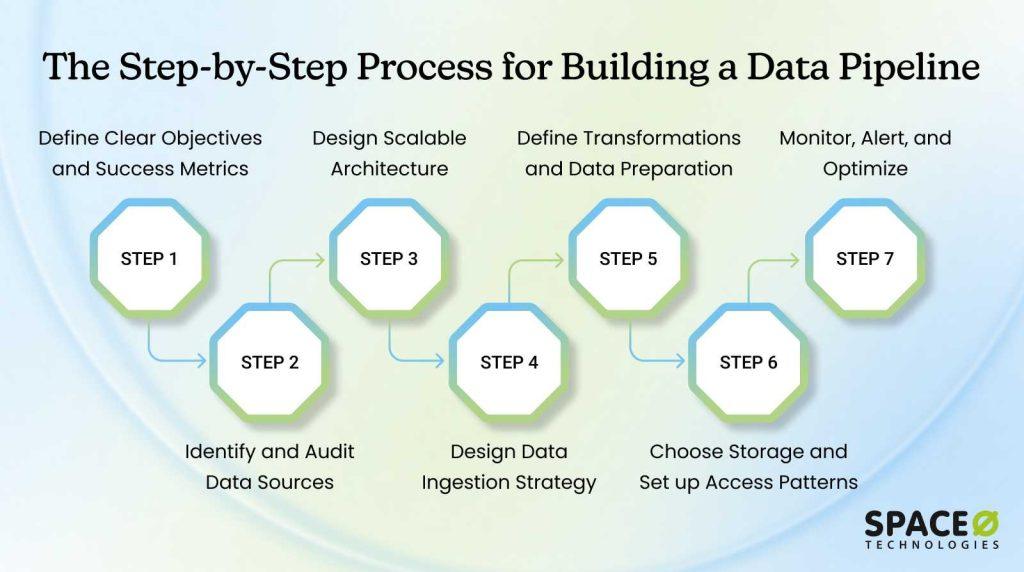
This framework shows you exactly how to build data pipelines that scale, perform, and support your business. Whether you’re starting from scratch or upgrading existing systems, these seven steps provide a proven roadmap. Follow them in order, and you’ll avoid most common pitfalls.
Step 1: Define clear objectives and success metrics
Start here. Before any technical decisions, understand what this pipeline must accomplish. When you create a data pipeline, success depends on having crystal-clear objectives upfront. Without clear objectives, you’ll build the wrong thing or build it wrong.
Many organizations skip this step because it feels like unnecessary planning. They jump straight to technology choices. This is a mistake. Misaligned objectives are the number one reason pipeline projects stall or fail after launch. Your technical team builds something different from what business teams actually need. Months of work deliver no value.
Ask yourself these questions
- What business problem does this solve? (Enable faster decisions? Automate manual processes? Support AI initiatives?)
- Who are the primary users? (Analysts, executives, engineers, business teams?)
- What success metrics matter? (Reduce reporting time by 80%? Cut errors by 90%? Enable real-time dashboards?)
- What’s your timeline and budget? (Weeks or months? Limited or enterprise funding?)
If you’re planning AI projects later, design for clean, deduplicated, properly formatted data now. Machine learning models have specific data requirements. Building with these requirements upfront saves painful rework later.
Actionable steps
- Document objectives in a one-page charter
- Get stakeholder alignment before proceeding
- Establish KPIs: processing time, data freshness, accuracy rates
| Pro Tip: Involve stakeholders early. Misaligned objectives kill projects after launch. Regular check-ins prevent building something nobody actually needs. |
Step 2: Identify and audit data sources
Map all data sources to create a comprehensive inventory. You can’t build without knowing where data comes from. This inventory becomes your reference guide throughout development. Data lives in many places across your organization. Some sources are obvious; your main transactional database.
Others are buried, spreadsheets in individual departments, API data from third-party services, or logs scattered across servers. Finding all of them requires systematic effort. You need to know what data exists, where it lives, what quality it has, and how to access it.
Common data sources
- Relational databases (PostgreSQL, MySQL)
- Non-relational databases (MongoDB)
- Cloud storage (AWS S3, Google Cloud Storage)
- APIs (REST, GraphQL)
- Real-time streams (Kafka, Kinesis)
- IoT devices, file-based sources (CSV, JSON, Parquet)
Assess each source on several dimensions
- Data relevance: Does it support your objectives? Is it accurate enough?
- Update frequency: Hourly? Daily? Weekly? Does it match your freshness requirements?
- Format complexity: Structured (clean tables) or unstructured (text, logs, images)?
- Compliance: Contains PII or sensitive data requiring special handling?
- Integration effort: Modern API available, or does extraction require custom work?
Actionable steps
- Create a spreadsheet documenting all potential sources
- Rate each source as high, medium, or low priority based on business impact
- Test connectivity to each source and document sample data
| Pro Tip: Compliance constraints matter. For healthcare pipelines, compliance considerations shape everything else. Start with compliance requirements, not as an afterthought. |
Step 3: Design scalable architecture
Your architectural choices determine performance, scalability, and cost. Proper data pipeline development starts with solid architecture. The right architecture handles growth without redesign. The wrong architecture forces costly rebuilds.
Architecture is where you decide how data flows through your system. Will you process everything in large batches overnight? Or handle data continuously as it arrives? Will everything live in one central location? Or remain distributed? These decisions ripple through everything that follows. Changing the architecture later is expensive. Getting it right up front saves months and significant resources.
Architectural patterns
- Batch processing: Large volumes processed together, ideal for daily reporting. Simple to build and debug.
- Stream processing: Continuous data flow, necessary for real-time alerts and operational dashboards.
- Lambda architecture: Separate batch and streaming layers. Provides both real-time and historical accuracy, but adds complexity.
- Kappa architecture: A Single streaming engine handles both real-time and historical data. Simpler operations, different thinking required.
- Hub-and-spoke: Centralized data repository. All sources feed one central location. Easy to manage and govern.
- Point-to-point: Direct source-to-consumer connections. Gets chaotic quickly as you add sources and consumers.
Key decisions
- How much data arrives and how frequently? Batch handles gigabytes daily. Streaming handles high-frequency, high-volume data.
- Can your infrastructure handle concurrent operations? Complex transformations on large datasets demand distributed processing.
- Build for modularity; upgrade components independently without rebuilding everything.
Actionable steps
- Choose a processing pattern that matches your requirements
- Design data flow diagrams showing sources and transformations
- Plan modular architecture (extract, transform, load separately)
- Select distributed processing frameworks if needed
| Pro Tip: Start simple, then add complexity only when you hit limits. Over-engineered pipelines waste resources. |
Step 4: Design data ingestion strategy
Ingestion is where data enters your pipeline. Get this right and everything downstream is easier. Poor ingestion creates cascading problems: duplicates, missing records, schema mismatches, and latency issues. Fix ingestion upfront rather than debugging downstream.
Ingestion determines latency (how fresh is your data?), reliability (what happens when something fails?), and cost (how much does extracting data cost?). Your ingestion strategy must balance speed, reliability, and cost based on your objectives defined in Step 1.
Ingestion approaches
- Pull-based: Your system periodically requests data from sources (works well for APIs and databases). Simple, but introduces latency between when data is created and when you have it.
- Push-based: Sources send data to you via events or webhooks (real-time). Lower latency but requires source system cooperation.
- Batch imports: Entire datasets arrive periodically (legacy systems). Simple, but means delayed data, sometimes days old.
- CDC (Change Data Capture): Only updates extracted, reducing volume and latency significantly. More complex but efficient.
Critical considerations
- Latency requirements (does data need to be current within minutes, hours, or is overnight acceptable?)
- Schema changes (does the source change its data structure occasionally? How do you detect and adapt?)
- Partial failure recovery (if ingestion fails mid-process, can it resume cleanly without duplicating earlier data?)
- Cost constraints (API rate limits or storage costs may force you toward batch rather than real-time?)
Actionable steps
- Decide: batch, streaming, or hybrid ingestion
- Design retry logic for failures
- Implement schema detection and validation
- Plan for incremental updates where possible
| Pro Tip: Build idempotent ingestion; processing the same data twice produces identical results. Prevents duplicates and corruption. |
Step 5: Define transformations and data preparation
Transformations turn raw data into useful information. This is where you create a data pipeline that delivers real business value. Without proper transformations, raw data is nearly useless. With proper transformations, it answers critical business questions.
Raw data from source systems is messy. It has duplicates, missing values, inconsistent formatting, and values that don’t match your expectations. Transformations clean this chaos into useful datasets. They standardize formats, remove duplicates, join related data, calculate new metrics, and prepare everything for analysis or machine learning.
Transformation types
- Cleaning: Remove duplicates, handle missing values, fix formatting. Makes data reliable.
- Enrichment: Add context by joining with reference data. Customer transaction plus customer details becomes a complete picture.
- Aggregation: Combine detailed records into summaries. Individual transactions become daily totals.
- Feature engineering: Create new variables from existing data. Useful for machine learning. Age calculated from birthdate. Purchase frequency from transaction history.
- Type conversion: Ensure data matches schema expectations. String dates converted to date types for proper sorting and calculations.
- For ML: Scale features, encode categories, handle imbalanced labels. Makes data suitable for machine learning models.
Specific transformation steps
- Standardize formats across sources (if one system stores dates as “12/31/2025” and another as “2025-12-31”, normalize both)
- Handle missing data (drop records with nulls? Use defaults? Forward-fill from previous values?)
- Remove duplicates (define what constitutes a duplicate—exact row match or same business entity?)
- Validate data constraints (amounts positive? Dates reasonable? Statuses match expected values?)
Actionable steps
- Map each transformation requirement
- Use dbt or a similar tool for clarity and reusability
- Write tests for transformation logic
- Document assumptions and business rules
- Version control all code
| Pro Tip: Keep transformations simple and testable. Avoid deeply nested logic that becomes impossible to debug. |
Step 6: Choose storage and set up access patterns
Select the right storage for your use case, then design how users access the data. Wrong storage choices create ongoing problems: slow queries, high costs, or inability to scale. Right storage choices enable your entire team to work efficiently.
Storage choice depends on how you’ll use the data. Data warehouse solutions excel at analytical queries but cost more. Data lakes are cheaper and more flexible, but slower. Lakehouse solutions try to bridge both, but add complexity. Different use cases need different storage types.
Storage options
| Type | Examples | Best for | Key trait |
| Data Warehouse | Snowflake, BigQuery, Redshift | Structured analytical queries | Fast queries, high cost |
| Data Lake | AWS S3 + processing | Flexible, raw-to-curated data | Cheap, slower queries |
| Lakehouse | Delta Lake, Apache Iceberg | Both approaches combined | Emerging, balancing both |
| Real-time DB | ClickHouse, TimescaleDB | Time-series, operational data | Sub-second queries |
Key considerations
- Query patterns (what will analysts ask? How fast do they need answers?)
- Data volume and growth trajectory (petabytes? Will you grow there?)
- Budget (compute, storage costs add up quickly at scale)
- Access speed requirements (real-time dashboards need different storage than daily reports)
- Compliance and data residency (must data stay on-premises or in specific regions?)
Actionable steps
- Compare warehouse vs. lake vs. lakehouse based on your use cases
- Design schema (star schema for analytics, denormalized for speed)
- Set up RBAC access controls
- Implement a data catalog for metadata management
- Plan backup and disaster recovery procedures
| Pro Tip: Use multi-tier storage; hot (recent, fast access), warm (older data), cold (archive). |
Step 7: Monitor, alert, and optimize
Pipelines require constant monitoring. Track performance, detect failures early, and optimize continuously. A working pipeline today may fail tomorrow if you don’t monitor it. Monitoring is the difference between success and silent failure.
Monitoring serves two purposes. First, it catches problems before users discover them. Second, it provides data to optimize performance and costs. Without monitoring, you don’t know what’s working, what’s broken, or what’s costing the most. With monitoring, you have facts guiding optimization decisions.
Monitor these dimensions
- Infrastructure: CPU, memory, network utilization, and processing time. Tells you if hardware is bottlenecking your pipeline.
- Data quality: Row counts, null rates, data freshness, schema conformance, anomalies. Tells you if the data is reliable.
- Business outcomes: Data accuracy through validation, stakeholder usage, and SLA achievement. Tells you if the pipeline serves its purpose.
Alerting strategy
Focus on business outcomes, not just infrastructure. “Data not fresh by 9 AM” matters more than “CPU at 80%.”
- Use Slack for minor issues (still needs attention)
- Use PagerDuty for critical failures (wakes people up)
- Use pages for emergencies (critical systems down)
- Tune carefully to avoid alert fatigue, where too many alerts get ignored
Optimization priorities
- Identify slow transformation steps and parallelize them (biggest impact on speed).
- Optimize costs through right-sizing compute and using reserved capacity (the biggest impact on the budget).
- Improve reliability through retries, circuit breakers, and redundancy (prevents future failures).
- Schedule regular reviews: weekly (health), monthly (performance), quarterly (architecture).
Actionable steps
- Set up monitoring dashboards (health, data quality)
- Define clear SLAs (when must data be fresh? What accuracy is acceptable?)
- Create runbooks for common failures (how to respond quickly)
- Schedule regular performance reviews
- Build feedback loops to notify data owners when issues are found
| Pro Tip: Treat monitoring as a first-class citizen, not an afterthought. Most pipeline failures are preventable with proper monitoring. |
This 7-step approach works whether you’re building your first pipeline or scaling to enterprise complexity. The key is following the sequence. Each step builds on the previous one. Skip steps or reorder them, and you’ll create problems that cost more to fix later.
The framework works in theory. But different industries face different challenges when building data pipelines. E-commerce needs real-time inventory. Healthcare needs compliance and security. Finance needs accuracy above all else. Here’s how leading organizations adapted this framework to meet their specific needs and achieved the measurable results they sought.
| Accelerate Your AI Projects with Strong Data Pipelines Avoid common pitfalls in AI development with properly managed data pipelines. Space-O AI provides solutions to keep your data workflows efficient, secure, and ready for innovation. Button |
Real-World Use Cases Across Industries
1. E-commerce: Real-time inventory and personalization
E-commerce companies manage inventory across multiple warehouses and update pricing dynamically. Traditional batch processing means inventory data is hours old. By the time customers see “in stock,” the item may be sold. A real-time streaming pipeline ingests inventory events instantly, flowing data to warehouses within seconds. This lets teams update catalogs and pricing in real-time.
Result: Companies reduce out-of-stock scenarios and increase conversion rates through real-time recommendations. Inventory write-offs improve due to better visibility.
2. Healthcare: Compliance-first architecture
Healthcare organizations manage sensitive patient data across EHRs, labs, and claims systems. HIPAA regulations mandate strict access controls and complete audit trails. A hub-and-spoke architecture with change data capture (CDC) centralizes data securely while maintaining comprehensive traceability. This creates a single source of truth for patient data while every access is logged and auditable.
Result: Audit findings are reduced through data lineage tracking. Clinical data accuracy improves, and compliance audits pass without remediation.
3. Finance: Real-time fraud detection
Banks and fintech companies must detect fraud instantly while minimizing false positives that block legitimate transactions. Lambda architecture separates batch processing for historical model training from streaming for real-time transaction scoring. This dual approach lets the pipeline learn from historical patterns while instantly protecting against new fraud schemes.
Result: Fraud detection improves significantly with minimal false positives. Processing high transaction volumes with exceptional uptime.
4. Manufacturing: Predictive maintenance
Manufacturing facilities generate massive sensor data from equipment and production lines. Equipment failures mean costly downtime. Real-time streaming pipelines ingest IoT sensor data, flowing to time-series databases where ML models predict failures before they happen. This shifts maintenance from reactive (fix after breaking) to proactive (fix before breaking).
Result: Unplanned downtime has been reduced significantly. Quality improves, and maintenance costs decrease through targeted interventions.
5. Retail: Daily store insights
Retail chains operate hundreds of stores, collecting sales, inventory, and customer behavior data. Nightly batch pipelines combine point-of-sale data with inventory systems to create unified customer views. Daily dashboards help store managers see what’s selling, what’s overstock, and which promotions work, enabling smarter decisions every morning.
Result: Store profitability improves. Marketing campaigns become more effective, and inventory management is optimized.
With the framework in place and real examples in mind, the next step is choosing the right tools to implement your pipeline.
Tools and Technologies for Building Data Pipelines
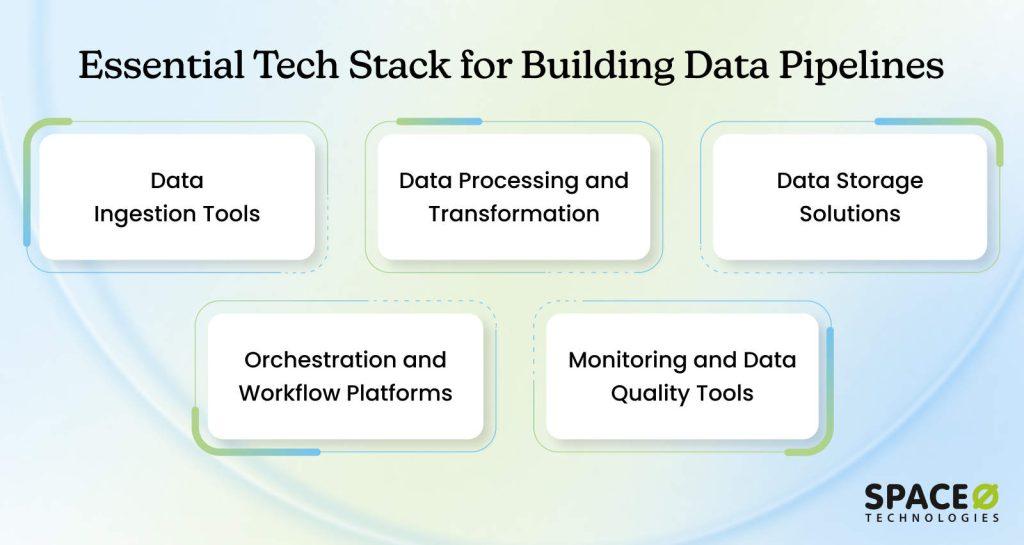
Building a pipeline requires the right tools. The market offers many options across ingestion, processing, storage, and orchestration. Understanding which category of tool solves which problem helps you make better choices for your specific needs.
1. Data ingestion tools
Ingestion tools extract data from source systems and move it into your pipeline. They handle connectivity, scheduling, and error recovery.
Popular options
- Apache Airflow: A Workflow orchestration tool that schedules and monitors data ingestion jobs. Open-source and highly customizable.
- Kafka: Distributed event streaming platform for real-time data ingestion. Handles high-volume, continuous data flows.
- Fivetran: Cloud-based connector platform that simplifies data ingestion without coding. Pre-built connectors for hundreds of sources.
- Stitch: Lightweight cloud platform for batch data ingestion. Good for smaller datasets and simpler pipelines.
Choose based on: Data freshness requirements (real-time vs. batch), source system type, and whether you prefer managed solutions or open-source.
2. Data processing and transformation
Processing tools transform raw data into useful information. They handle cleaning, enrichment, aggregation, and complex calculations.
Popular options
- Apache Spark: Distributed processing framework handling large-scale transformations. Fast and scalable across clusters.
- dbt (Data Build Tool): SQL-based transformation tool that makes transformations modular and testable. Great for analytics workflows.
- Python with Pandas: Lightweight option for smaller data volumes. Flexible but requires coding expertise.
- Snowflake or BigQuery SQL: Direct SQL transformations within your data warehouse. Simple and integrated.
Choose based on: Data volume, transformation complexity, SQL vs. code preference, and team expertise.
3. Data storage solutions
Storage is where processed data lives and where users query it. The choice affects query speed, cost, and scalability.
Popular options
- Snowflake: Cloud-native data warehouse. Fast queries, pay-as-you-go pricing, and support structured data well.
- BigQuery: Google’s managed data warehouse. Serverless, integrates with the Google Cloud ecosystem, fast analytics.
- Redshift: Amazon’s data warehouse. Integrates with AWS, good for organizations already in AWS.
- AWS S3: Simple object storage. Cost-effective for large data volumes but slower queries. Often paired with processing tools.
- Delta Lake: Open-source lakehouse platform combining data lake flexibility with warehouse reliability. Emerging and increasingly popular.
Choose based on: Query patterns, cost sensitivity, existing cloud infrastructure, and need for real-time analytics vs. batch reporting.
4. Orchestration and workflow platforms
Orchestration tools schedule, monitor, and manage your entire pipeline. They handle dependencies, retries, and alerting.
Popular options
- Apache Airflow: Open-source workflow orchestration. Highly flexible, large community, steep learning curve.
- Dagster: Modern orchestration platform with strong data quality features. Good for complex pipelines.
- Prefect: Cloud-native orchestration with simpler syntax than Airflow. Easier to learn and deploy.
- dbt Cloud: Managed orchestration specifically for dbt workflows. Integrates directly with dbt.
Choose based on: Pipeline complexity, preference for managed vs. self-hosted, and the team’s Python skills.
5. Monitoring and data quality tools
Monitoring tools track pipeline health. Data quality tools catch issues before they reach users.
Popular options
- DataDog or New Relic: Infrastructure monitoring for CPU, memory, and processing time.
- Monte Carlo: A Data quality platform that detects anomalies automatically.
- Great Expectations: Open-source tool for defining and testing data quality rules.
- CloudWatch (AWS) or Stackdriver (GCP): Cloud-native monitoring integrated with your platform.
Choose based on: Whether you want comprehensive monitoring, data quality focus, or both, and your existing cloud platform.
Build Reliable Data Pipelines with Expert Support
Space-O AI’s experienced data engineers can design, implement, and manage end-to-end data pipelines, ensuring your analytics and AI projects run smoothly. Get expert guidance today.
Build Reliable Data Pipelines for Data Driven Success
A strong data pipeline is no longer optional for businesses aiming to leverage analytics or AI. It ensures that your data flows seamlessly, remains accurate, and is ready for actionable insights. Without a robust pipeline, even the most advanced AI and analytics initiatives can fail to deliver value, delay decision making, and increase operational risks.
At Space-O AI, we specialize in building and managing scalable, reliable data pipelines that power AI, machine learning, and analytics projects. With extensive experience in designing end-to-end data workflows, integrating modern data stacks, and supporting ML development, we help businesses transform raw data into actionable intelligence efficiently and securely.
Check our portfolio to see how global organizations transformed their technology infrastructure through custom solutions we built tailored to their unique challenges.
AI Receptionist (Welco)
Space-O Technologies built Welco, an AI-powered receptionist system for a USA-based entrepreneur. Using NLP and voice technology, Welco automates 24/7 call handling, appointment scheduling, and multilingual customer support. The solution reduced missed inquiries by 67%, delivering consistent service without additional staff hiring.
AI Document Analyzer and QA System
For a USA-based church, Space-O developed an AI document analyzer with an integrated QA system. The platform lets admins upload documents like Bible study notes, which the AI processes into vector embeddings. Followers access AI chatbots to answer questions about these documents, making teachings more accessible.
Canvas 8 (Figma-to-HTML Converter)
Canvas 8 is an AI-driven platform that converts Figma design prototypes into functional HTML code in minutes. The platform generates production-ready code with up to 80% accuracy, eliminating manual coding and accelerating web development for designers and agencies worldwide.
If you are ready to streamline your data processes, enhance your AI initiatives, and build pipelines that scale with your business, consult with our experts today and take the first step toward a data-driven future.
Frequently Asked Questions About Data Pipelines
How long does it take to build a data pipeline?
The timeline depends on complexity. A simple batch pipeline for basic reporting takes 8–12 weeks. More complex real-time pipelines with multiple data sources and transformations take 3–6 months.
Enterprise-scale pipelines with strict compliance requirements can take 6–12 months. The key is starting with clear objectives and avoiding scope creep. Most delays happen when requirements change mid-project.
What’s the typical cost of building a data pipeline?
Building a data pipeline typically costs anywhere from $10,000 to $100,000, depending on complexity, data sources, real-time needs, and tooling. Larger, scalable enterprise pipelines can exceed $250,000+, especially if custom development and cloud infrastructure are required.
Ongoing maintenance, monitoring, and updates often add $50,000–$150,000 annually. Costs vary based on tech stack, automation, and team expertise. Overall, complexity, scale, and integration requirements drive the final budget.
Do we need to replace our existing tools?
Not necessarily. Modern pipelines often integrate with existing systems rather than replace them. You might keep your current databases and add new tools for ingestion, orchestration, or monitoring. The question isn’t “replace or keep” but “what gaps exist in your current setup?” A data pipeline complements existing infrastructure.
What is data pipeline architecture, and why does it matter?
Data pipeline architecture is how you structure your system to collect, process, and deliver data. It determines performance, scalability, and cost. Poor architecture creates bottlenecks and expensive rebuilds later. Good architecture scales with your business without major redesigns.
Architecture choices include batch vs. streaming, centralized vs. distributed storage, and cloud vs. on-premise. Your business requirements should drive architectural decisions, not the other way around.
Can we build a pipeline ourselves, or do we need external help?
Small, straightforward pipelines can be built in-house with skilled engineers. Complex pipelines with multiple systems, real-time requirements, or compliance needs benefit from external expertise. Many organizations hire AI consultants for the design phase to ensure solid data pipeline architecture, then handle maintenance internally. Hybrid approaches work well.


Let Space-O AI Manage Your Data Pipelines
What to read next