- What is Conversational AI?
- Types of Conversational AI Solutions
- Benefits of Building Your Own Conversational AI
- How to Build Conversational AI (The 8-Step Process)
- Step 1: Define your goals and use cases
- Step 2: Assess your technical foundation
- Step 3: Choose your development approach
- Step 4: Prepare your training data
- Step 5: Design conversation flows and user experience
- Step 6: Develop and train your AI model
- Step 7: Integrate and test everything
- Step 8: Deploy and continuously optimize
- How Different Industries Are Using Conversational AI Today
- Challenges in Implementing Conversational AI and How to Overcome Them
- How Much Does It Cost to Build a Conversational AI?
- Hire Expert AI Developers from Space-O AI to build your Conversational AI Solution
- Frequently Asked Questions About Building Conversational AI
- What is the difference between conversational AI and a traditional chatbot?
- How long does it take to build a conversational AI?
- Can conversational AI integrate with my existing systems?
- What are the biggest risks of building conversational AI?
- What happens after I deploy conversational AI?
- Should I build conversational AI in-house or work with a partner?
How to Build a Conversational AI: Process, Benefits, Cost, and Use Cases

 Last Updated: January, 16 2026
Conversational AI has quickly evolved into one of the most impactful technologies for customer experience, automation, and digital interaction. Unlike traditional chatbots that rely on rigid rules, conversational AI uses natural language processing and large language models to understand intent, hold context, and generate human-like responses.
As per Grand View Research, the global conversational AI market reached 11.58 billion dollars in 2024 and is projected to grow to 41.39 billion dollars by 2030. This growth reflects the rising demand for AI-powered automation across industries.
But developing a reliable conversational AI requires more than connecting to a model. It involves strategic planning, conversation design, data preparation, architecture decisions, integrations, testing, and continuous optimization.
Whether you are a product manager mapping new features, a founder exploring AI capabilities, or a CX leader planning automation, having clarity on the entire process is essential. With our 15+ years of experience as a leading AI software development agency, we understand what it takes to build a powerful conversational AI solution.
This guide walks you step-by-step through the entire process of building a conversational AI solution, from planning and design to development, testing, and deployment. Whether you’re new to conversational AI or scaling it across your business, you’ll find clear, practical guidance here.
What is Conversational AI?
Conversational AI is a technology that enables machines to understand, process, and respond to human language in a natural and meaningful way. It uses a combination of natural language processing, machine learning, and large language models to interpret user input, understand intent, maintain context, and generate helpful responses.
The goal is to create interactions that feel natural, accurate, and human-like
How does conversational AI work?
Here’s the basic flow when someone interacts with a conversational AI system:
- Input Processing: A user types a message or speaks into a microphone. The system captures this raw input.
- Intent Recognition: The AI analyzes what the user actually wants. Maybe they asked, “Where’s my order?” but the AI recognizes they’re seeking order status information.
- Context Understanding: The system retrieves relevant information about this specific customer, their history, and what they’ve asked about before.
- Response Generation: The AI crafts a response that’s relevant, helpful, and sounds human. It pulls data from your systems and formulates an answer.
This entire process happens in seconds. The user gets an answer instantly instead of waiting on hold for a human agent.
The key technologies behind conversational AI
None of this magic happens without the right technology working together behind the scenes. Here are the core technologies that power conversational AI systems.
- Natural Language Processing (NLP): This is how the system understands human language. It breaks down sentences into components, identifies context, and figures out what the user means.
- Machine Learning (ML): This allows the system to improve over time. Every conversation teaches the AI something new about how to respond better.
- Large Language Models (LLMs): These are AI models like GPT-4, Claude, or LLaMA that have been trained on massive amounts of text data. They can understand complex language and generate human-like responses.
- Retrieval-Augmented Generation (RAG): This connects the AI to your actual business data. Instead of making up answers, it retrieves real information from your knowledge base, CRM, or database and uses that to respond.
- Dialogue Management: This keeps conversations flowing naturally. It tracks what’s been discussed, remembers context, and ensures the conversation doesn’t go in circles.
Types of Conversational AI Solutions
Not all conversational AI implementations look the same. Here are the main types you’ll encounter:
- Text-based chatbots: These live on websites or messaging platforms like Facebook Messenger. Users type questions and get instant text responses.
- Voice assistants: Think Siri or Alexa. Users speak their requests and get voice responses back.
- AI conversational chatbots: These combine NLP with business logic. They can answer questions, process transactions, and escalate to humans when needed.
- Multi-agent systems: In complex scenarios, multiple specialized AI agents work together. One might handle billing questions, another handles technical support, and they coordinate to solve complex issues.
- Omnichannel deployments: The same conversational AI services operate across multiple channels: your website, mobile app, WhatsApp, Facebook Messenger, etc.
Which type you build depends on where your customers are and what problems you’re solving.
Build a Custom Conversational AI With Space-O AI
Create your own conversational AI with a team that has more than 15 years of experience and over 500 successful AI solutions delivered. Get expert guidance for planning, designing, training, and deploying a system tailored to your business goals.
Benefits of Building Your Own Conversational AI
Building your own conversational AI gives your business far more flexibility and long-term value compared to using generic, off-the-shelf chatbots. It allows you to shape the user experience, control the underlying technology, and create an AI system that aligns perfectly with your goals.
1. Full control over user experience
When you build your own conversational AI, you decide exactly how the AI communicates. You can fine-tune tone, style, response structure, and conversation flow based on your brand. This level of control helps you deliver a consistent and polished experience that feels natural to users and supports your business objectives.
2. Custom integrations with internal systems
Every business relies on unique tools, processes, and data sources. A custom conversational AI can integrate directly with your CRM, support platform, knowledge base, inventory system, or payment gateway.
These integrations allow the AI to provide accurate answers, complete tasks, and automate workflows in real time.
3. Ability to tailor the model to your use case
Generic conversational systems are designed to be universal, but they often lack depth in specific domains. By building your own AI, you can train the model on your internal documentation, product details, customer queries, and historical interactions.
This domain-specific tuning improves accuracy, reduces errors, and makes the AI significantly more helpful for your users.
4. Competitive differentiation
A custom conversational AI can become a strategic advantage. It helps you offer faster responses, smarter recommendations, and more personalized interactions than competitors using standard bots.
Over time, the AI becomes a differentiator that enhances customer experience and supports new digital offerings.
5. Better privacy and security control
When you develop your own conversational AI, you maintain full control over how data is collected, processed, and stored. This allows you to enforce strict security practices, ensure compliance with industry regulations, and keep customer information confidential.
It also reduces risks associated with third-party tools that may have limited visibility or weaker controls.
Now that you understand what conversational AI is and why it matters, the real question becomes: how do you actually build one? Let’s walk through the complete process, step by step, from initial planning through deployment and beyond.
How to Build Conversational AI (The 8-Step Process)
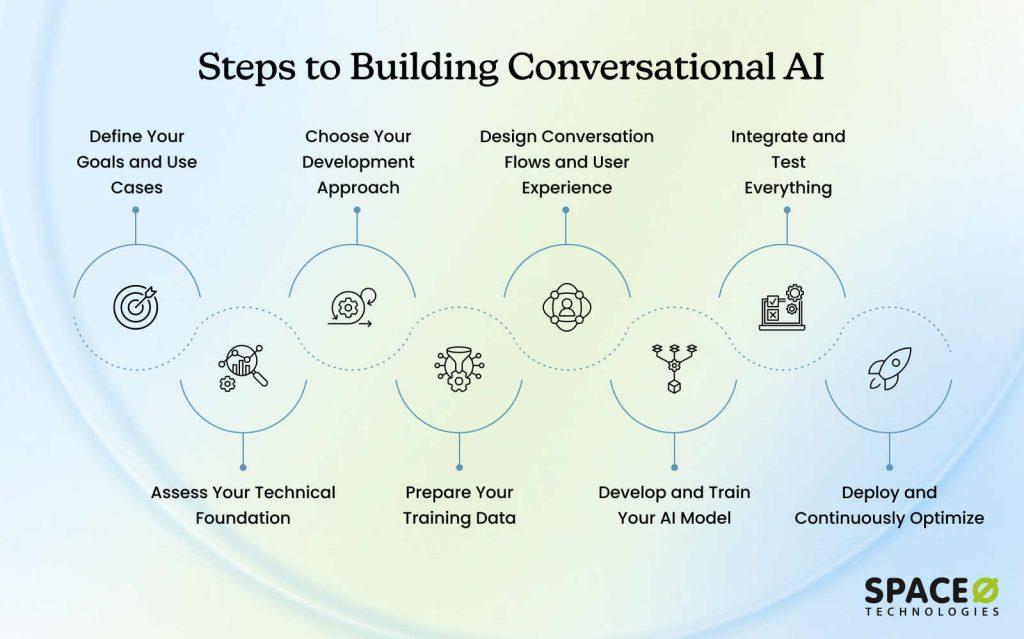
Building a conversational AI requires a structured approach. Whether you’re developing for customer support or deploying across channels, this 8-step framework guides you from planning through production-ready deployment. Follow this process and avoid expensive mistakes.
Step 1: Define your goals and use cases
Timeline: Weeks 1–2
Before you touch any code or AI models, you need clarity on what you’re actually building. Write down the specific problem you’re solving (not just “improve customer experience” but “reduce support ticket volume by handling routine FAQ questions”). Identify which department or team will benefit first and start narrow: one use case, not five.
Key activities
- Document your specific business problem
- Identify 2–3 focused use cases
- Define measurable success metrics
- Interview stakeholders who’ll use this system
Teams that skip this step often end up building something that solves the wrong problem. Clarity on objectives prevents months of wasted work and keeps your project aligned with actual business needs.
Step 2: Assess your technical foundation
Timeline: Weeks 2–3
Understand what you’re working with. Evaluate your current systems (CRM, databases, APIs), data availability, compliance requirements, and security needs. Do you have historical customer conversations? FAQs? Documentation? This assessment determines whether you build in-house, use a platform, or partner with a development team.
Key activities
- Audit existing systems and technology stack
- Assess data availability and quality
- Identify compliance and security requirements
- Evaluate team expertise and capacity
A realistic assessment of your technical foundation prevents costly surprises later. Knowing what you have now helps you choose the right approach and budget appropriately for the gaps you need to fill.
Step 3: Choose your development approach
Timeline: Weeks 3–4
You have three main options, each with different timelines, costs, and customization levels. This decision is crucial because it determines not just how fast you launch, but how much control you have over the system and how easily you can adapt it as your needs change. Evaluate which approach aligns with your timeline, budget, and complexity needs.
Option A: Build in-house
You assemble an internal team of ML engineers, data scientists, and developers. You have complete control over every aspect of the system. The downside? It takes 6–12 months and requires significant upfront investment in hiring and infrastructure. This approach makes sense if you have complex requirements, deep technical talent already on staff, or need to keep sensitive data completely isolated.
Option B: Use a no-code platform
Platforms like Botpress or Dialogflow let you build conversational AI without writing code. You can launch in 2–8 weeks at a lower cost. The tradeoff is customization. You’re limited to what the platform offers. This works well for straightforward use cases like FAQ handling or basic customer support.
Option C: Work with an AI development partner
You partner with an experienced team that specializes in conversational AI. They handle the technical complexity while you maintain strategic oversight. This is ideal if you need something custom-built but don’t want to hire and manage a full internal team.
| Approach | Timeline | Cost | Customization | Best For |
| Build In-House | 6–12 months | Higher upfront | Complete control | Complex requirements, sensitive data |
| No-Code Platform | 2–8 weeks | Lower | Limited | Simple use cases, fast MVP |
| Work with Partner | 3–6 months | Medium | High | Custom solutions, faster delivery |
Key activities
- Compare build vs. buy vs. partner options
- Request proofs of concept from vendors
- Evaluate partner experience in your industry
- Negotiate contracts and timelines
- Assess your internal capabilities honestly
The approach you choose determines your speed to market, total cost of ownership, and long-term flexibility. This decision cascades through every subsequent step, so getting it right here saves significant time and money downstream.
Step 4: Prepare your training data
Timeline: Weeks 4–8
Here’s the truth: 80% of your project success depends on data quality. Collect historical customer conversations, FAQs, product documentation, company policies, and industry terminology. Clean it. Label it. Make sure it’s diverse, accurate, and representative of real use cases.
Key activities
- Collect and organize training data
- Clean and standardize formats
- Label conversations with intent and entities
- Create domain-specific glossaries
- Identify edge cases and exceptions
Garbage in, garbage out. An AI trained on poor-quality data will give poor-quality responses. Investing time in data preparation now prevents months of dealing with an AI that doesn’t understand your business or customers.
Step 5: Design conversation flows and user experience
Timeline: Weeks 8–12
Map how conversations will actually happen. Design multiple conversation paths, define how the system handles confusion, plan escalation to humans, and create natural dialogue that feels helpful, not robotic.
Key activities
- Map user intents to business outcomes
- Design conversation flows for key scenarios
- Create error handling and escalation paths
- Develop tone and voice guidelines
- Build conversation prototypes
Thoughtful conversation design is the difference between a chatbot people want to use and one they avoid. Good UX keeps users engaged, reduces frustration, and ensures your AI actually solves problems instead of creating new ones.
Step 6: Develop and train your AI model
Timeline: Weeks 12–20
Select your LLM (GPT-4, Claude, LLaMA), train it with your domain data, implement safety guardrails, connect it to your business systems via RAG, and test performance until it meets your accuracy benchmarks.
Key activities
- Select and configure LLM
- Fine-tune with your training data
- Implement guardrails and compliance rules
- Set up RAG integration with business data
- Conduct performance testing
Quality benchmarks
- Intent recognition accuracy: 95%+
- Response satisfaction: 80%+ of test users
- Escalation rate: Less than 15%
- Response time: Under 1 second
Model development is where your data preparation and conversation design come together. Testing against clear benchmarks ensures your AI is ready for real-world usage before you risk deploying it to customers.
Model development requires expertise in LLM selection, fine-tuning, RAG implementation, and performance testing. Whether you build in-house or hire AI developers to handle this phase, ensure your team meets the above quality benchmarks.
Step 7: Integrate and test everything
Timeline: Weeks 20–24
Connect your AI to your CRM, databases, and support systems. Set up security protocols. Run tests with internal teams, real users, and under load conditions. Find and fix issues before going live.
Testing phases
- Unit Testing: Individual conversation flows and API connections
- User Acceptance Testing: Real users test the system
- Load Testing: Performance under peak volume
- Security Testing: Vulnerability and compliance checks
Key activities:
- Integrate with existing systems
- Implement security and encryption
- Conduct multi-phase testing
- Document issues and resolutions
- Prepare deployment checklist
Integration problems and security issues are expensive to fix after launch. Thorough testing catches problems early when they’re cheap to fix, not after your customers have already had bad experiences.
Step 8: Deploy and continuously optimize
Timeline: Weeks 24+
Launch with a phased rollout: start with 5-10% of traffic, monitor closely, expand to 25%, then full deployment. After launch, continuously monitor performance, collect feedback, and improve the system.
Deployment strategy
- Week 1: 5-10% of traffic (parallel with humans)
- Week 2-3: Expand to 25% of traffic
- Week 4+: Full deployment
Ongoing activities
- Monitor performance dashboards daily
- Review failed conversations weekly
- Retrain the model quarterly with new data
- Collect and act on user feedback
- Track ROI metrics continuously
Key metrics to monitor:
- Accuracy rates and error trends
- Customer satisfaction scores
- Escalation rates
- Cost per interaction
- System uptime and performance
Deployment isn’t the finish line; it’s the beginning. Conversational AI systems improve over time with proper monitoring and maintenance. The teams that succeed are those that treat their AI as a living system that requires ongoing attention and refinement.
Now that you understand the complete process for building conversational AI, let’s look at how organizations across industries are actually putting this technology to work. Their real-world applications show what’s possible when conversational AI is implemented correctly.
Turn Your Conversational AI Idea Into a Working Solution
Work with AI specialists who understand your use case and help you build a high-quality conversational AI from strategy to production. Accelerate development with our proven methodology and deep technical expertise.
How Different Industries Are Using Conversational AI Today
Conversational AI isn’t just theoretical anymore. Businesses across every industry are deploying conversational artificial intelligence platforms to solve real problems and drive measurable results. Here’s how different industries are putting conversational AI to work, and what you can learn from their success.
1. eCommerce
Main Use Cases: Product discovery, inventory checking, order tracking, returns processing
Solutions: AI-powered chatbots, product recommendation engines, automated order tracking systems
eCommerce businesses use conversational AI software solutions through intelligent chatbots that help customers find products, check inventory, process returns, and track orders. You can partner with a custom AI chatbot development company to build a conversational AI tool for your eCommerce website.
Instead of customers searching through FAQs or waiting for email responses, the AI answers instantly through chat interfaces and can make personalized product recommendations based on browsing history.
2. Healthcare
Main Use Cases: Appointment scheduling, medication reminders, patient triage, health inquiries
Solutions: AI scheduling assistants, SMS reminder systems, symptom checker chatbots, patient intake forms
Healthcare providers deploy conversational AI through virtual assistants that handle appointment scheduling, send medication reminders, and answer routine patient questions via chatbots.
Patients can schedule appointments through text, chat, or voice interfaces at any time without calling. The system handles basic inquiries while escalating serious medical concerns to actual doctors or nurses through escalation workflows.
3. Banking and Finance
Main Use Cases: Account inquiries, transaction verification, fraud detection, loan applications
Solutions: Virtual banking assistants, fraud detection bots, loan processing chatbots, transaction query systems
Banks use conversational AI agents through voice and chat interfaces to help customers check account balances, review transactions, and get fraud alerts. Instead of calling during business hours, customers get instant answers about their accounts 24/7 through interactive voice response (IVR) systems or chatbots.
The system also flags suspicious activity and protects against fraud through verification protocols built into the conversational flow.
For regulated industries, many banks partner with AI agent development service providers to ensure compliance requirements are properly implemented alongside these capabilities.
4. Customer support
Main Use Cases: FAQ handling, ticket routing, issue resolution, customer escalation
Solutions: Omnichannel support bots, automated ticket routing systems, knowledge base chatbots, escalation workflows
Customer support teams deploy conversational AI integration across multiple channels like website chat, WhatsApp, email, and social media. The system remembers conversations across channels through unified platforms, so customers don’t have to repeat themselves.
Routine questions get answered instantly through chatbots while complex issues automatically route to human agents, creating a seamless blend of automation and human support.
5. Manufacturing
Main Use Cases: Equipment monitoring, predictive maintenance, downtime prevention, operational alerts
Solutions: IoT-connected monitoring systems, predictive maintenance bots, equipment status dashboards, alert notification systems
Manufacturing facilities use conversational artificial intelligence platforms to monitor equipment and predict when maintenance is needed. These systems analyze sensor data and alert maintenance teams through SMS, chat, or voice notifications before problems occur.
Instead of waiting for equipment to break down, teams get proactive alerts, reducing unplanned downtime and emergency repair costs.
Understanding how conversational AI works across different industries is inspiring. But the path to success isn’t always smooth. Every organization implementing it faces real challenges, regardless of its conversational AI use cases. Let’s talk about the obstacles you’ll likely encounter and practical ways to overcome them.
Need Help Building Your Own Conversational AI?
Our AI experts can design custom workflows, train domain specific models, and integrate your system with CRM, support tools, and internal databases. Get a solution built for real world performance.
Challenges in Implementing Conversational AI and How to Overcome Them
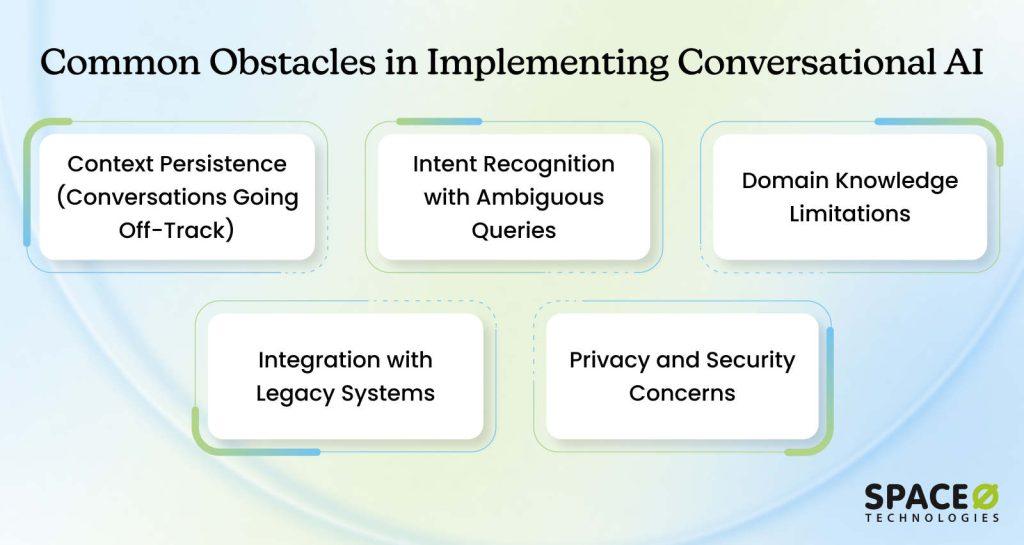
Even with the best planning, teams encounter obstacles around data quality, integration complexity, user adoption, and maintaining accuracy over time. The organizations that succeed aren’t those without challenges; they’re the ones with strategies to address them head-on.
Challenge 1: Context persistence (Conversations going off-track)
Long conversations lose context. The AI conversational bot forgets what the user asked about three messages ago. Customers get frustrated when they have to repeat information or when the bot seems confused about the original problem.
Solutions
- Implement explicit conversation state tracking to store and reference previous messages
- Design conversation flows that summarize context before proceeding
- Use session storage to maintain conversation history across interactions
- Create decision points that confirm understanding before moving forward
- Train the conversational AI models to proactively reference earlier parts of the conversation
Challenge 2: Intent recognition with ambiguous queries
Users phrase requests vaguely. “Fix my stuff” could mean product issue, service problem, account problem, or anything else. When a chatbot conversational AI encounters these unclear requests, it struggles to understand what the user actually wants without asking clarifying questions.
Solutions
- Teach the bot to ask clarifying questions when the intent is unclear
- Provide multiple-choice options to guide users toward specific intents
- Use context from previous interactions to make educated guesses
- Implement confidence thresholds that trigger clarification requests
- Continuously update training data with real ambiguous queries from users
Challenge 3: Domain knowledge limitations
The AI gives generic answers that don’t match your specific business. It doesn’t know your unique policies, exceptions, or the complexities of how your company actually operates. Without domain-specific knowledge, your conversational AI becomes just another generic chatbot that frustrates customers more than helps them.
Solutions
- Implement RAG (Retrieval-Augmented Generation) to connect to your real business data
- Build comprehensive knowledge bases with company-specific information
- Fine-tune models with your proprietary data and procedures
- Create domain-specific glossaries and terminology guides
- Establish regular knowledge base updates as policies change
Challenge 4: Integration with legacy systems
Your CRM is 15 years old. Your databases don’t have modern APIs. The conversational AI architecture can’t connect to real data, so it gives generic responses or errors. This integration gap forces your AI to operate in isolation, unable to access customer information, transaction history, or business logic that would make it actually useful.
Solutions
- Use middleware and data bridges to translate between old and new systems
- Build custom API layers to connect legacy infrastructure
- Prioritize modernizing critical systems based on ROI
- Work with integration specialists who understand legacy systems
- Consider phased modernization as you expand and deploy conversational AI across more use cases
Challenge 5: Privacy and security concerns
Voice and text data are sensitive. Data breaches expose customer information and create legal liability. Compliance with GDPR, HIPAA, and other regulations adds complexity. One security incident can destroy customer trust, trigger fines, and derail your entire conversational AI initiative before it delivers any value.
Solutions
- Implement end-to-end encryption for all data in transit and at rest
- Follow GDPR, HIPAA, and industry-specific compliance requirements
- Use differential privacy techniques to prevent the extraction of individual records
- Conduct regular security audits and penetration testing
- Maintain clear data usage policies and obtain customer consent
You know the challenges. You understand the pitfalls. Now comes the practical question every leader asks: What’s the actual investment required? Let’s talk realistic budgets so you can make an informed decision.
How Much Does It Cost to Build a Conversational AI?
The cost of building a conversational AI can vary widely depending on the complexity of the solution, the development method you choose, and the level of customization required. While some businesses can get started with affordable no-code platforms, others need fully customized, enterprise-grade conversational artificial intelligence platforms that require larger investments.
To make the cost easier to understand, it helps to look at the three main development paths for how to build a conversational AI.
1. No-code/Low-code platforms
Ideal for small to mid-sized businesses looking to launch quickly without heavy coding or AI engineering expertise. These platforms handle the technical complexity, letting you focus on conversation design and user experience instead. If you want to deploy conversational AI fast for straightforward use cases, no-code platforms are your quickest path to production.
Examples: Dialogflow, Botsonic, Botpress, Landbot, Azure Bot Service
| Cost Component | Estimated Price |
| Platform subscription | $0–$1,500/month |
| Setup and configuration | $2,000–$15,000 one-time |
| Training and optimization | Included or $500–$5,000 |
Best for: Simple FAQs, lead qualification, basic conversational chatbot workflows.
Typical cost range: $2,000–$20,000 upfront + subscription fees
2. Custom conversational AI development
Custom development is suited for businesses that need advanced capabilities such as conversational AI integration, custom conversational AI models, multilingual support, or domain-specific training. This approach gives you complete control over your conversational AI architecture and AI conversational bot behavior.
| Cost Component | Estimated Price |
| Requirements analysis and design | $5,000–$30,000 |
| Model development and training | $20,000–$150,000+ |
| Conversation design + testing | $10,000–$50,000 |
| Integrations (CRM, ERP, support systems) | $15,000–$100,000 |
| Deployment + optimization | $5,000–$30,000 |
Best for: Enterprises, large support environments, and regulated industries (banking, healthcare, insurance) needing advanced conversational AI solutions and conversational AI agents.
Typical cost range: $60,000–$400,000+
3. Hybrid approach
A hybrid approach blends platform features with custom components, offering scalability without starting from scratch. You get the speed of platforms with the flexibility of custom development, splitting your investment between proven infrastructure and custom conversational AI software solutions. This middle ground works well for organizations exploring different conversational AI use cases.
| Cost Component | Estimated Price |
| Platform subscription | $500–$3,000/month |
| Custom integrations and enhancements | $10,000–$100,000 |
| AI tuning, persona creation, analytics | $5,000–$30,000 |
Best for: Businesses with mid-to-advanced needs who want flexibility without full custom development.
Typical cost range: $20,000–$150,000 upfront + subscription fees
Key Factors That Influence Cost
The final cost depends on several variables that compound based on your specific needs. Understanding these factors helps you estimate your budget more accurately and identify where you can optimize spending.
- Use Case Complexity: Simple FAQ handling costs far less than multi-turn conversations requiring business logic, decision trees, and workflow automation.
- Technology Choice: Open-source models are cheaper than proprietary LLMs. Hosted AI services cost more than managing infrastructure yourself.
- Integration Requirements: A chatbot that only lives on your website is cheaper than one that connects to CRM, ERP, payment systems, and support ticketing platforms.
- Language Support: Single-language implementations are straightforward. Multilingual systems require additional training data, cultural adaptation, and testing.
- Security & Compliance Needs: Basic security is standard. HIPAA-compliant healthcare systems, GDPR-compliant European deployments, or SOC2-certified solutions add high cost.
- Training Data Availability: Using existing customer transcripts and documentation is cheaper than creating synthetic data or hiring teams to label conversations.
The more personalization, intelligence, and backend automation required, the higher the investment. A simple FAQ bot might cost $10K. A fully integrated, multilingual, HIPAA-compliant healthcare agent could cost $300K+. Most organizations fall somewhere in between.
Ongoing Maintenance Costs
Building the conversational AI is just the beginning. The real work happens after launch. Your system needs continuous attention to stay accurate, relevant, and effective as business needs change and user interactions evolve.
What You’ll Pay For Annually:
Your ongoing maintenance typically includes several components:
- Model Retraining: As user behavior changes and new use cases emerge, the AI needs fresh training data and fine-tuning to maintain accuracy.
- Performance Tuning: Monitoring dashboards, analyzing failed conversations, and optimizing response times and escalation rates.
- Analytics and Reporting: Tracking system performance, user satisfaction, cost savings, and ROI to justify continued investment.
- Feature Enhancements: Adding new capabilities, integrating with additional systems, and expanding to new channels as your business grows.
- Content and Knowledge Base Updates: Keeping FAQs, policies, and business rules current as your company evolves.
Expect to spend 10–30% of your initial build cost annually for maintenance. If you invested $300,000 to build the system, plan for $30,000–$90,000 per year to keep it running well.
Organizations that skimp on maintenance see their systems degrade quickly. Accuracy drops. Escalation rates climb. Customer frustration grows. It’s a false economy. The maintenance investment ensures your conversational AI continues delivering ROI year after year.
Get a Clear Estimate for Your Conversational AI Project
Whether you need a customer support assistant, internal workflow bot, or domain-trained AI, our team helps you build it cost-effectively. Get an accurate quote tailored to your use case.
Hire Expert AI Developers from Space-O AI to build your Conversational AI Solution
You now understand what conversational AI is, how to build it, what it costs, and the challenges you’ll face. The remaining question is straightforward: will you build it yourself, use a platform, or partner with experts? Each path has tradeoffs. The right choice depends on your timeline, budget, technical capability, and complexity needs. Space-O AI helps organizations make this decision and execute it successfully.
Organizations that partner with experienced teams move faster and achieve better results. With 15+ years of AI expertise and 500+ completed projects across healthcare, finance, manufacturing, and retail, we understand the full journey. We’ve helped teams avoid the common pitfalls, choose the right approach from day one, and build conversational AI systems that integrate seamlessly with existing infrastructure.
Our focus is simple: deliver measurable business results, not technical complexity. Check our portfolio to see how we’ve helped organizations across industries build conversational AI systems that actually work.
AI Receptionist (Welco)
Space-O developed an AI-powered receptionist system with NLP and voice technology for a USA-based entrepreneur. Welco provides 24/7 automated call handling across multiple businesses, reducing missed inquiries by 67% while ensuring every customer interaction is captured and managed efficiently without human intervention.
AI Product Recommendation Chatbot (Moov AI)
Our team built an AI-powered product recommendation chatbot for Moov Store, Saudi Arabia’s leading eCommerce platform, in just 22 days. Moov AI uses OpenAI and vector embeddings to deliver personalized product suggestions, significantly increasing conversion rates and saving users up to 85% shopping time.
WhatsApp AI Chatbot for Roofing Company
We developed a WhatsApp-based AI chatbot using GPT-3.5 and Laravel for a 50-year-old roofing company with 500 employees. The bot retrieves business analytics instantly from their management software, providing quick data access for informed decision-making and streamlined customer interactions on the go.
Ready to know exactly where your organization stands and what comes next? Book your free consultation with our AI consultants today. Let’s discuss your specific challenges, identify your highest-impact opportunities, and create a clear path forward.
Frequently Asked Questions About Building Conversational AI
What is the difference between conversational AI and a traditional chatbot?
Traditional chatbots follow scripted rules: if the user says X, respond with Y. They’re rigid and can’t handle variations in how people phrase things. Conversational AI uses machine learning and natural language processing to understand what people actually mean, even when they phrase things differently.
It learns from conversations and improves over time. Modern conversational AI feels like talking to a human because it understands context, remembers previous interactions, and adapts its responses.
How long does it take to build a conversational AI?
Conversational AI development timelines vary by approach. A no-code platform can get you started in 2–8 weeks. A custom-built solution typically takes 3–6 months for a pilot and 6–12 months for enterprise deployment.
The timeline depends on data readiness, complexity, integration requirements, and how much customization you need. Most organizations start with a focused pilot to validate the concept quickly, then scale based on results.
Can conversational AI integrate with my existing systems?
Yes, but integration complexity varies based on your conversational AI architecture. Connecting to modern systems with APIs is straightforward. Legacy systems without APIs require middleware or custom integration work, which adds cost and time.
Plan for integration work as part of your budget. Most implementation challenges involve connecting conversational AI to existing CRM, ERP, support, and knowledge systems.
What are the biggest risks of building conversational AI?
The main risks are poor data quality (which produces poor responses), trying to do too much at once (which delays launch), underestimating integration complexity, and not planning for ongoing maintenance.
Organizations that fail often didn’t start with a clear problem, didn’t involve stakeholders, or didn’t budget for continuous improvement. Real conversational AI examples show that success comes from starting narrow, involving your team, and planning for iteration.
What happens after I deploy conversational AI?
Deployment isn’t the end. It’s the beginning. Understanding how to deploy conversational AI successfully means planning for ongoing monitoring, user feedback collection, reviewing failed conversations, and quarterly model retraining.
Budget 10-30% of your initial investment annually for maintenance. Organizations that succeed treat conversational AI as a living system that improves over time, not a one-time build.
Should I build conversational AI in-house or work with a partner?
That depends on your timeline, budget, and internal expertise. Building in-house gives you complete control but takes longer and requires significant technical talent. Using a no-code platform is fast but limits customization.
Working with a partner combines speed and customization while handling the complexity of conversational AI architecture and integration. Consider: How quickly do you need this? What’s your budget? Do you have AI talent on staff?


Build Your Conversational AI With Experts
What to read next